Link Aadhaar-User Manual
1. Overview
As per the provisions of section 139AA of Income Tax Act,1961 or section 262 of Income Tax Act,2025 it is mandatory to link PAN with Aadhaar. For new applicants of PAN card, the Aadhaar PAN linking is done automatically during the application stage. For existing PAN holders, who were allotted PAN on or before 01-07-2017 it is mandatory to link PAN with Aadhaar. The Link Aadhaar service is available to individual taxpayers (both registered and unregistered) on e-Filing Portal (www.incometax.gov.in). If you do not link your PAN with the Aadhaar, your PAN will become inoperative. However, there are some people who fall under the exempted category will not be subject to the effects of PAN becoming inoperative.
There are two main steps for linking Aadhaar with PAN.
1. Payment of Aadhaar PAN link Fee on e-filing portal (under minor head 500 with in the Major head 0021 in Single challan)
2. Link Aadhaar with PAN on e-filing portal.
Post link Aadhaar with PAN you can check the status using link Aadhaar status functionality.
2. Prerequisites for availing this service:
- Valid PAN
- Aadhaar number
- Valid mobile number
3. How to make payment of Aadhaar-PAN link fee on e-Filing Portal
Step 1: Visit the e-Filing Portal Home page.
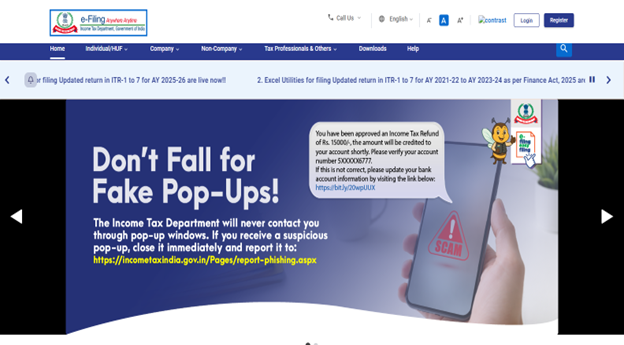
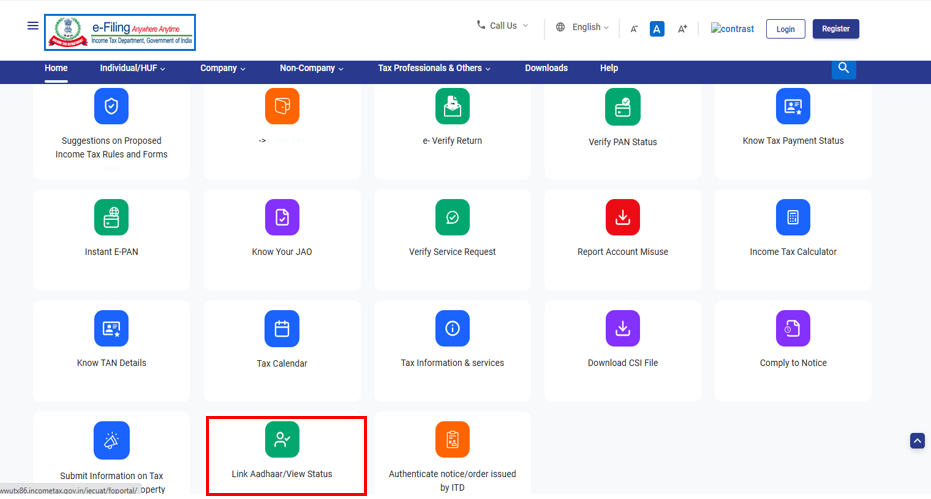
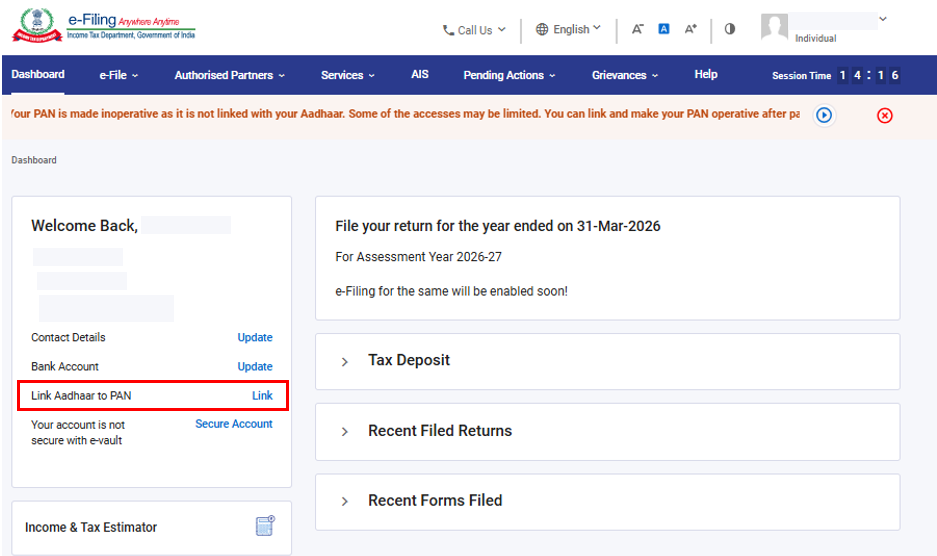
Click on ‘Link Aadhaar’ in Quick Links section. Alternatively, login to e-filing portal and click on ‘Link Aadhaar’ in ‘Profile’ section.
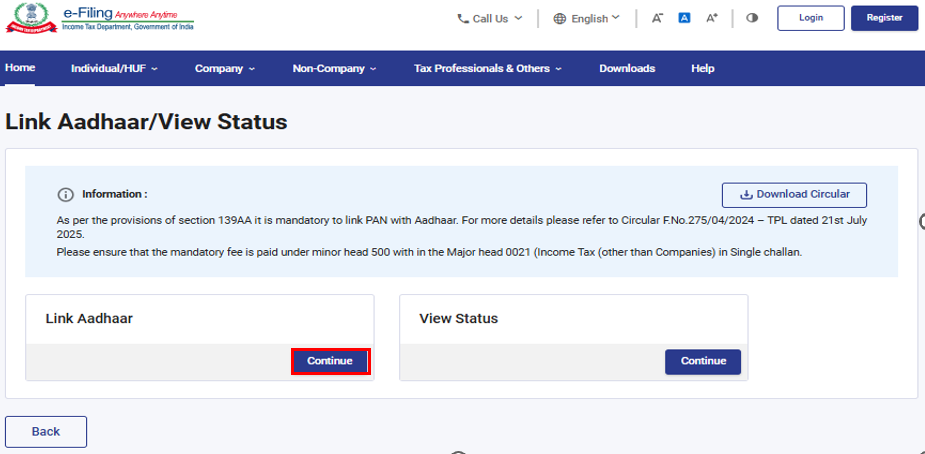
Step 2: Click on ‘Continue’ in ‘Link Aadhar’ section.
Step 3: Enter your PAN and Aadhaar Number and click ‘Validate’.
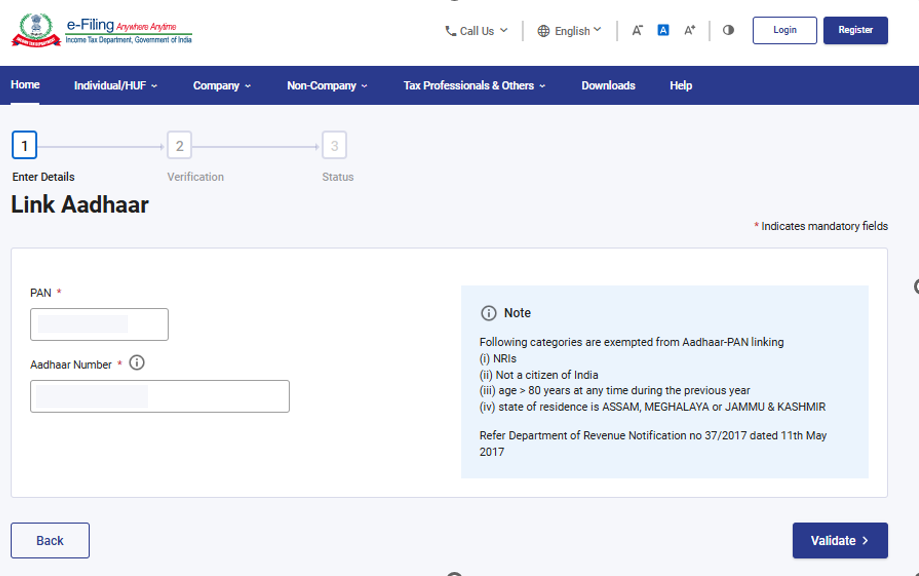
Step 4: Click on ‘Continue to Pay Through e-Pay Tax’.
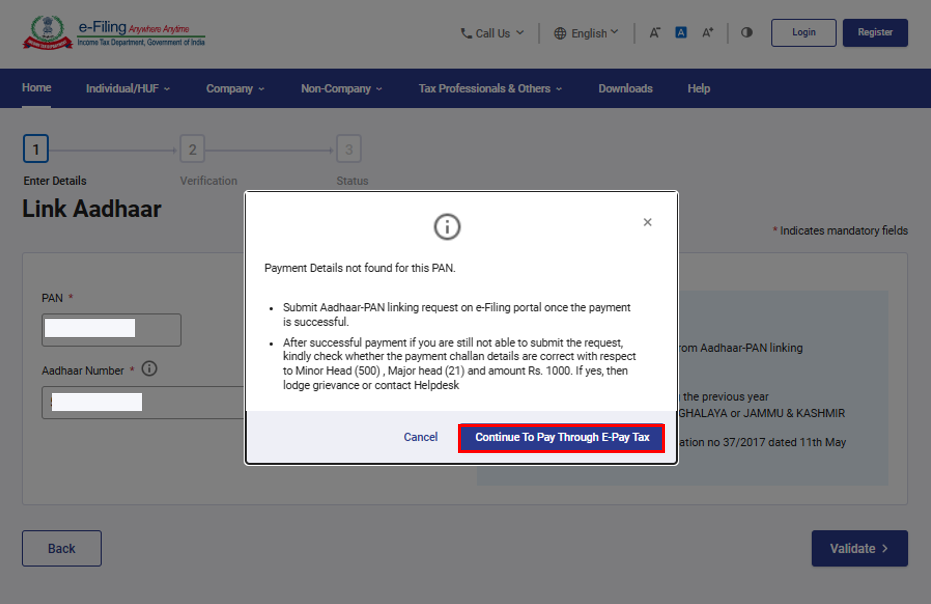
Step 5: Select Applicable Income Tax Act, 2025 and click ‘Continue’.
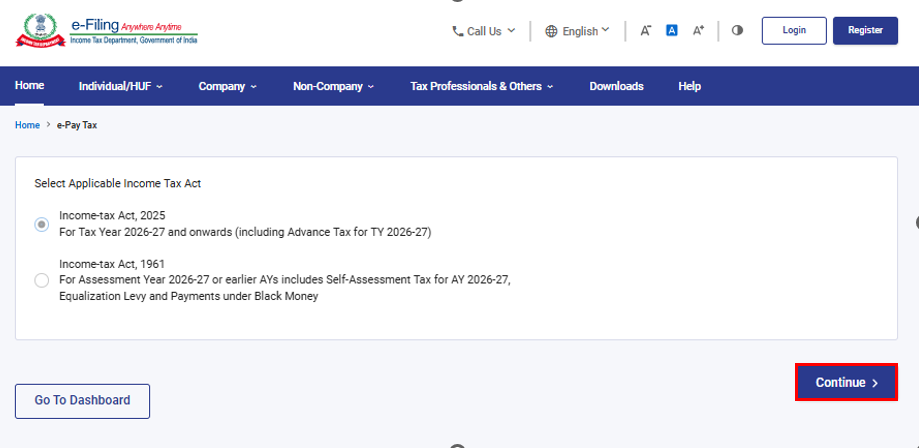
Step 6: Enter your PAN, confirm PAN, and any valid mobile number to receive OTP.
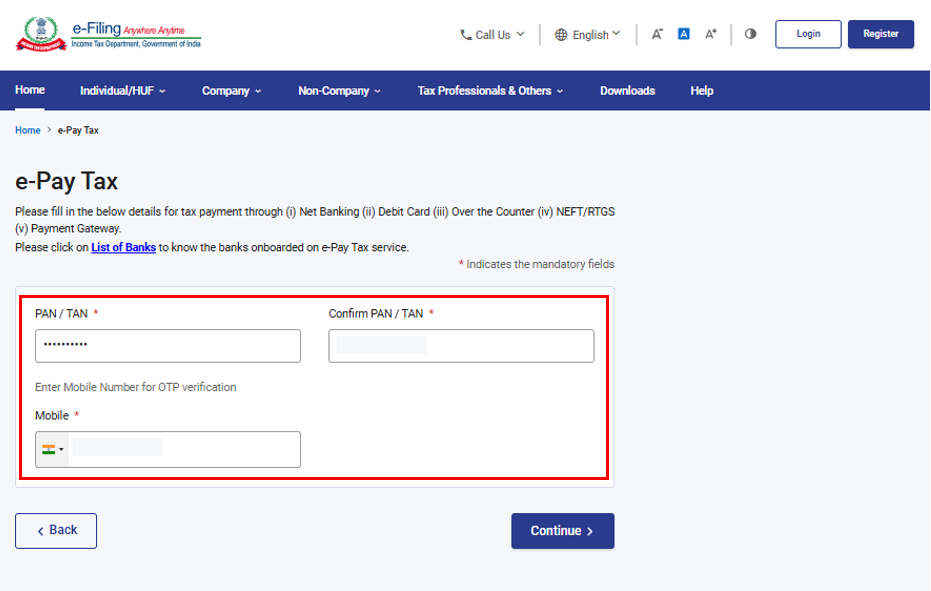
Step 7: Post OTP verification, you will be redirected to e-Pay Tax page. Click on ‘Continue’.
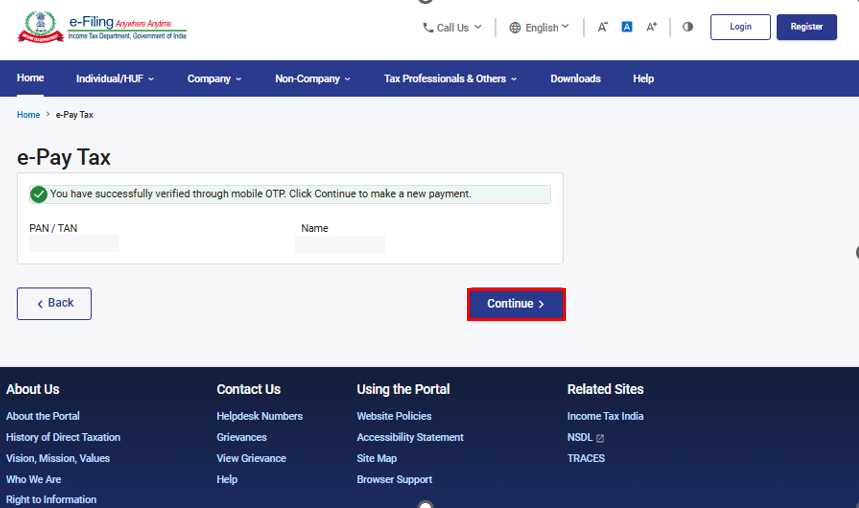
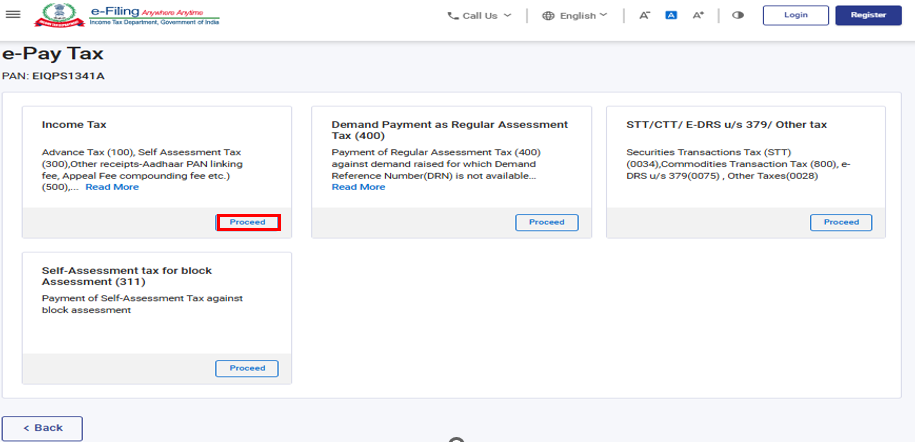
Step 8: Click on ‘Proceed’ in the ‘Income Tax’ tile.
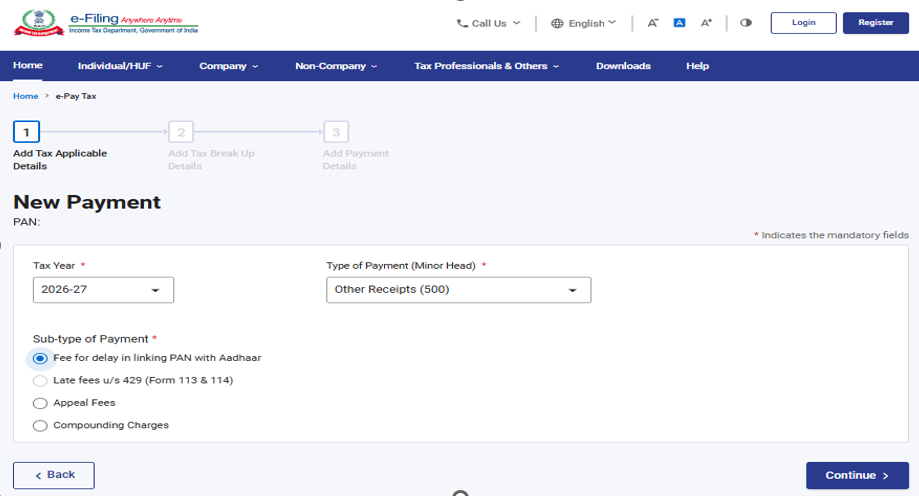
Step 9:Select the relevant Tax Year, Type of Payment as Other Receipts (500), Sub type of Payment (Fee for delay in Linking Pan with Aadhaar) and click ‘Continue’.
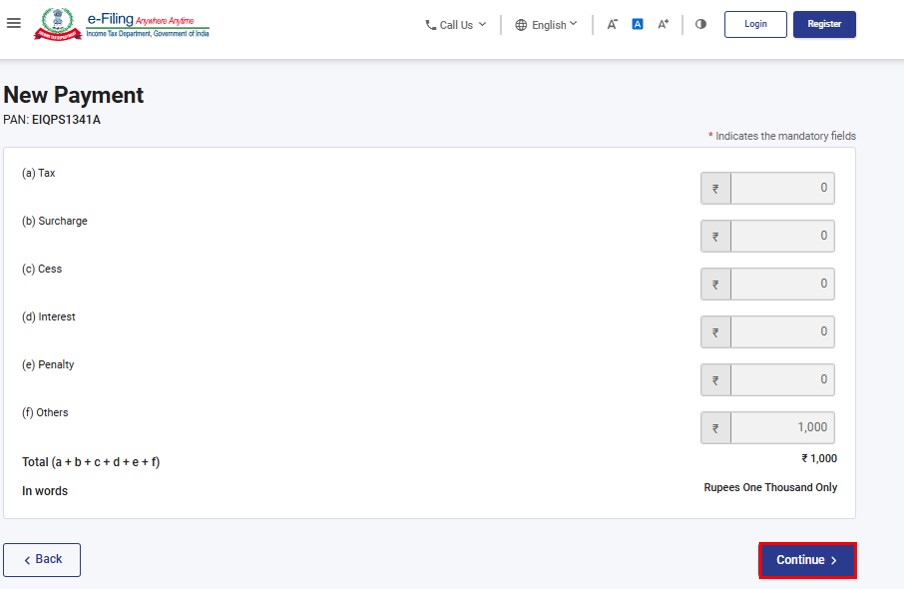
Step 10:Applicable amount will be pre-filled against Others. Click ‘Continue’.
Now, challan will be generated. On the next screen, you must select the mode of payment. After selecting the mode of payment, you will be re-directed to the Bank website where you can make the payment.
Post payment of fee, you can link your Aadhaar with PAN on the e-Filing Portal.
4. How to Submit the Aadhaar PAN link request post Payment of Fee
Aadhaar PAN link request can be made both in the Post login as well as in Pre-login mode.
The steps for each of the mode are detailed below one by one:
Submit Aadhaar PAN link Request (Post login):
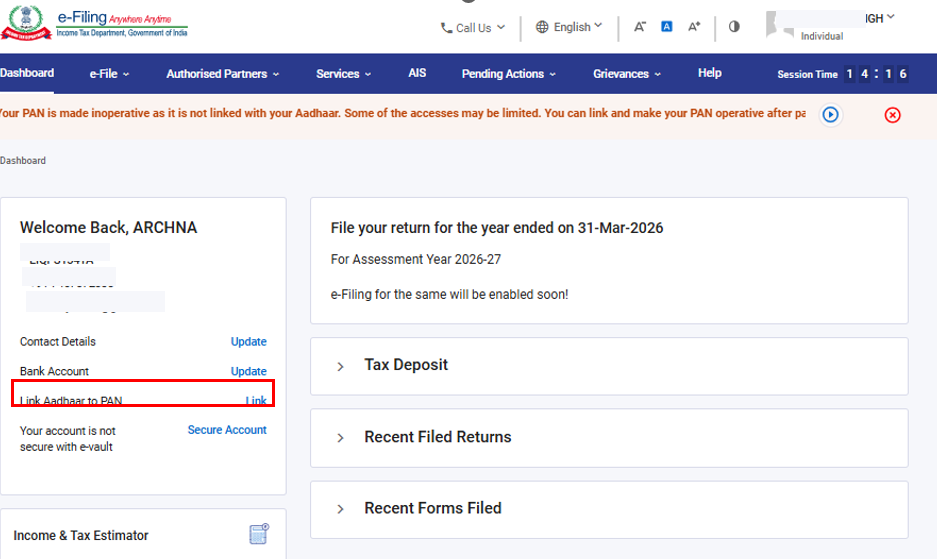
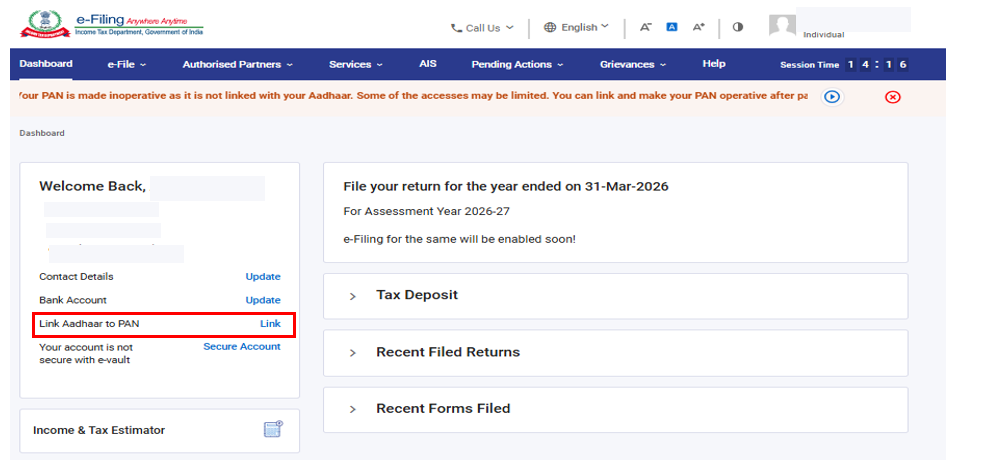
Step 1: Go to e-filing Portal > ‘Login’ > On Dashboard, in Profile section under the Link Aadhaar to PAN option, click ‘Link Aadhaar’.
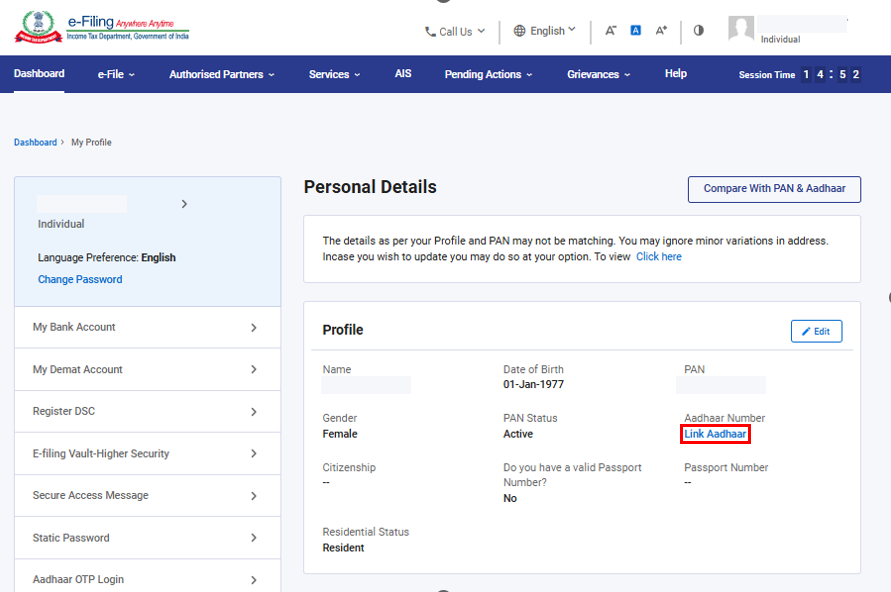
Or alternatively, click on ‘Link Aadhaar’ in personal details section.
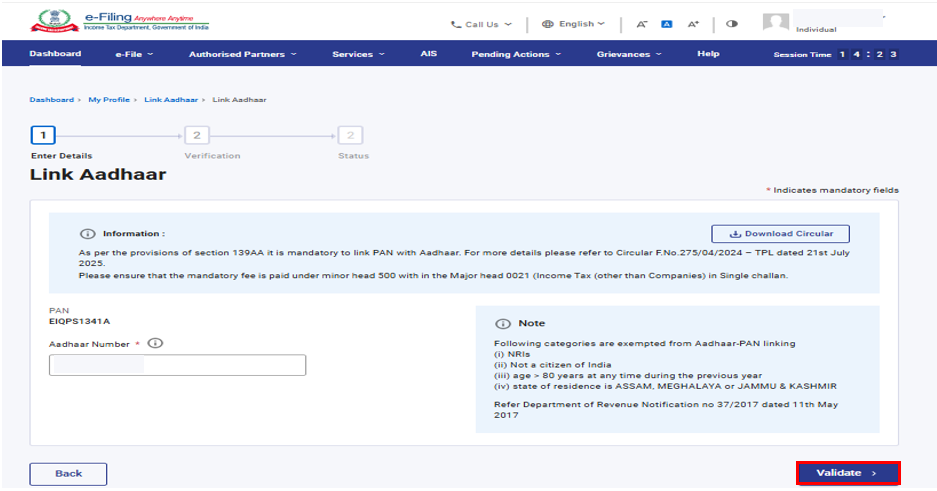
Step 2: Enter the Aadhaar number and click on ‘Validate’.
Submit Aadhaar PAN link Request (Pre-login):
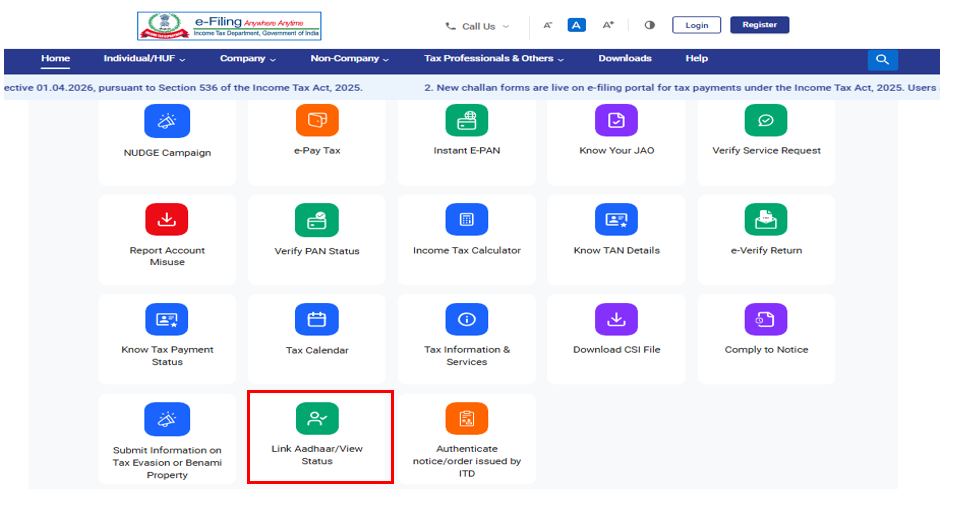
Step 1: Go to e-filing portal home page and click on ‘Link Aadhaar’ under ‘Quick Links’.
Step 2: Click on ‘Continue’ in Link Aadhaar section.
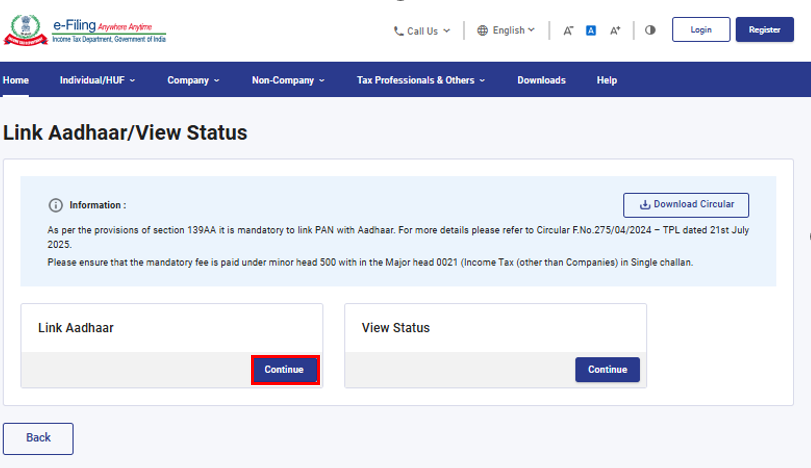
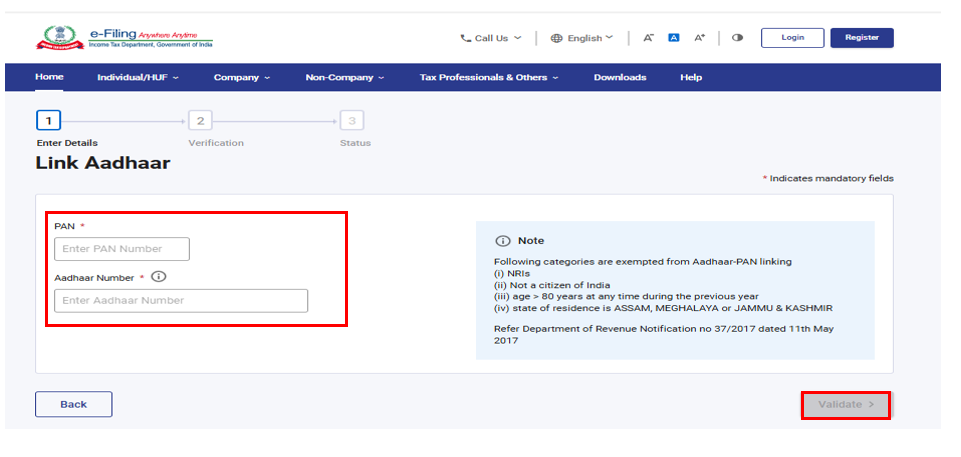
Step 3: Enter the PAN and Aadhaar and click ‘Validate’.
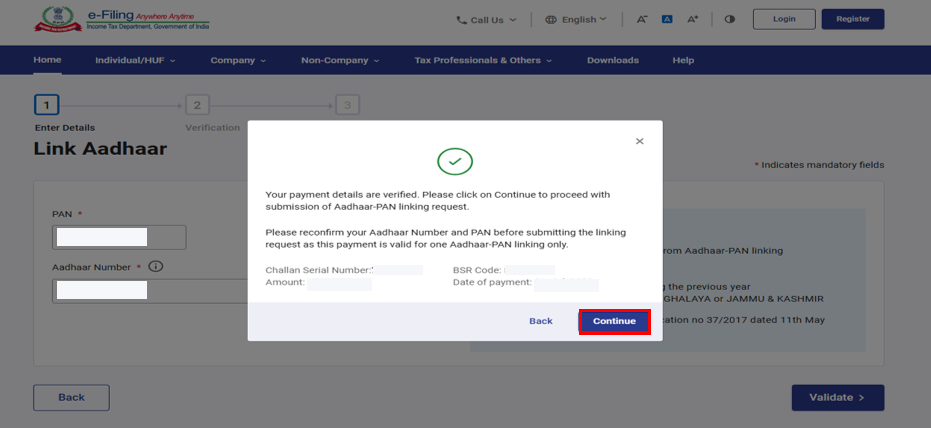
If you have made the payment of Aadhaar PAN Link fee, payment details will be verified. Click ‘Continue’.
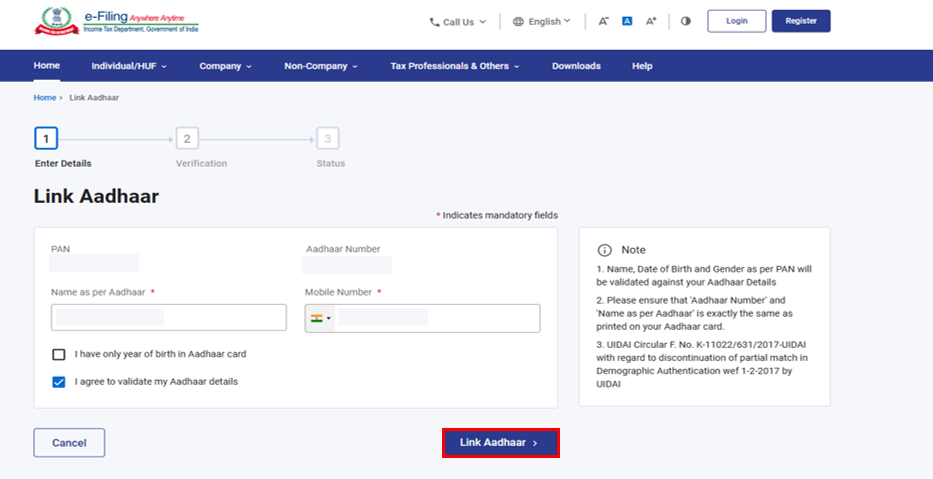
Step 4: Enter the mandatory details as required and click on ‘Link Aadhaar’.
Step 5: Enter the 6-digit OTP received on mobile number mentioned in the previous step and click on ‘Validate’.
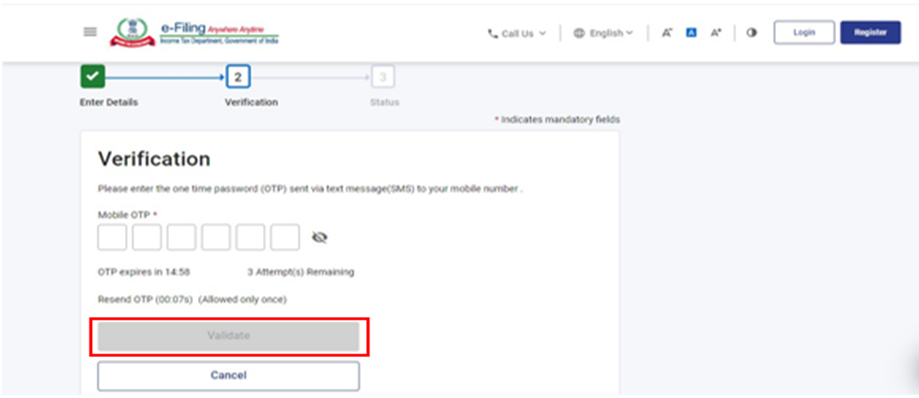
Step 6:Request for link of Aadhaar has been submitted successfully, now you can check the Aadhaar-PAN link status.
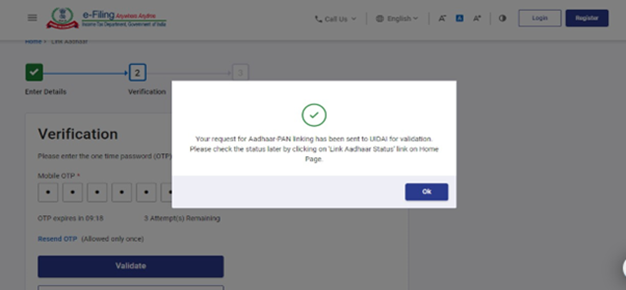
Scenario 1: If the payment details are not verified on the e-Filing Portal.
Step 1: After validating PAN and Aadhaar, you will see a pop-up message that
'Payments details not found'. Click on 'Continue To Pay Through e-Pay Tax' for the payment of fee as payment of fee is the pre-requisite to submit the Aadhaar PAN link request.
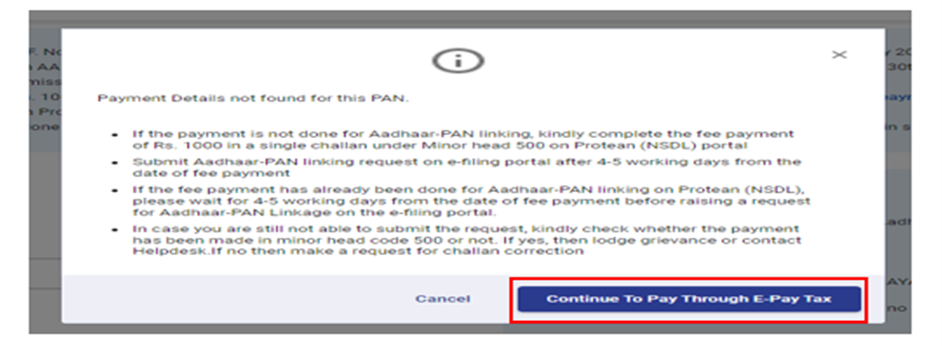
Note: If you have already paid the fee, then wait for 4-5 working days. After that, you can submit the request.
Note: Please ensure you link your correct Aadhaar with your PAN.
If Aadhaar and PAN are already linked or PAN linked to some other Aadhaar or vice versa, you will get following errors:
Scenario 2: PAN is already linked with the Aadhaar or with some other Aadhaar:
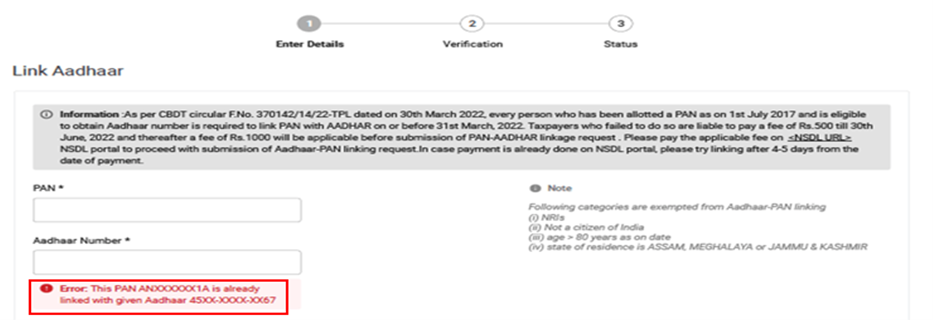
You may need to contact your Jurisdictional Assessing Officer and submit a request for delinking your Aadhaar with incorrect PAN.
To know your JAO’s contact details, visit https://eportal.incometax.gov.in/iec/foservices/#/pre-login/knowYourAO(Prelogin)
Or https://eportal.incometax.gov.in/iec/foservices/#/dashboard/myProfile/jurisdictionDetail (Post login)
Scenario 3: If you have made payment of Challan and payments and details are verified at e-filing Portal.
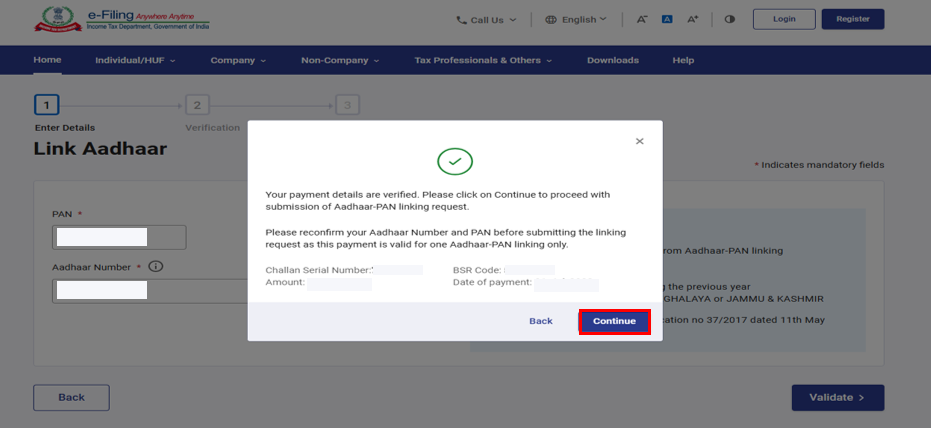
Step 1: After validating PAN and Aadhaar you will see a pop-up message that 'Your payment details are verified'. Please click 'Continue' on the pop-up message to submit Aadhaar PAN linking request.
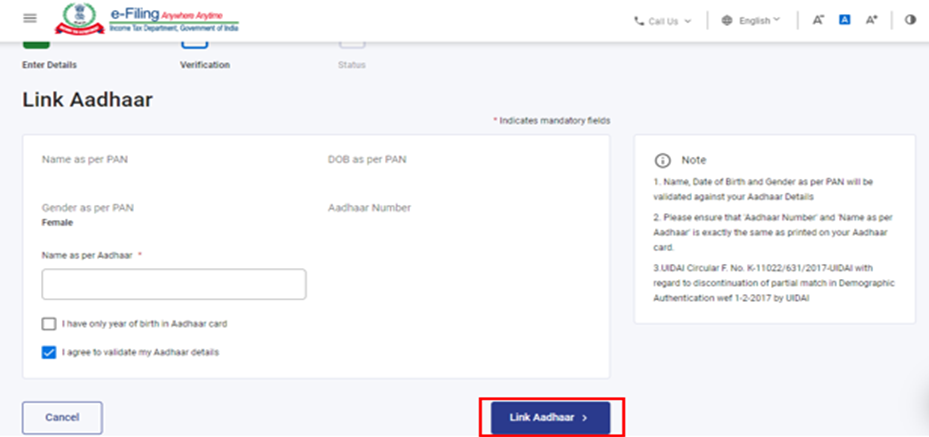
Step 2: Enter the required details and click on 'Link Aadhaar' button.
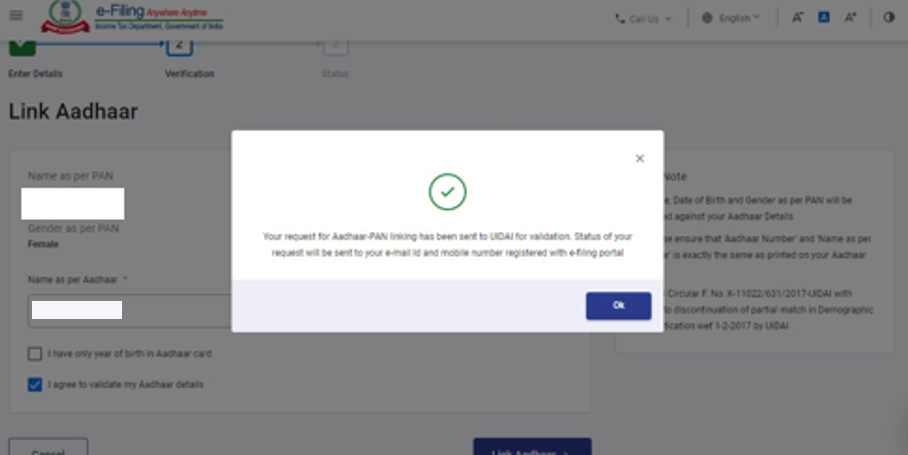
Step 3: Request for link of Aadhaar PAN has been submitted successfully, now you can check the Aadhaar PAN link status.
5. View Link Aadhaar Status (Pre-Login)
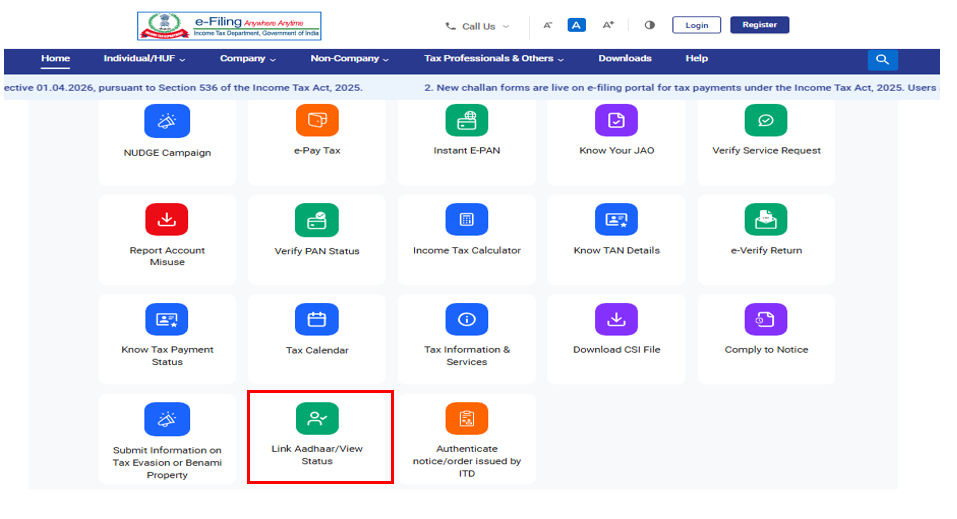
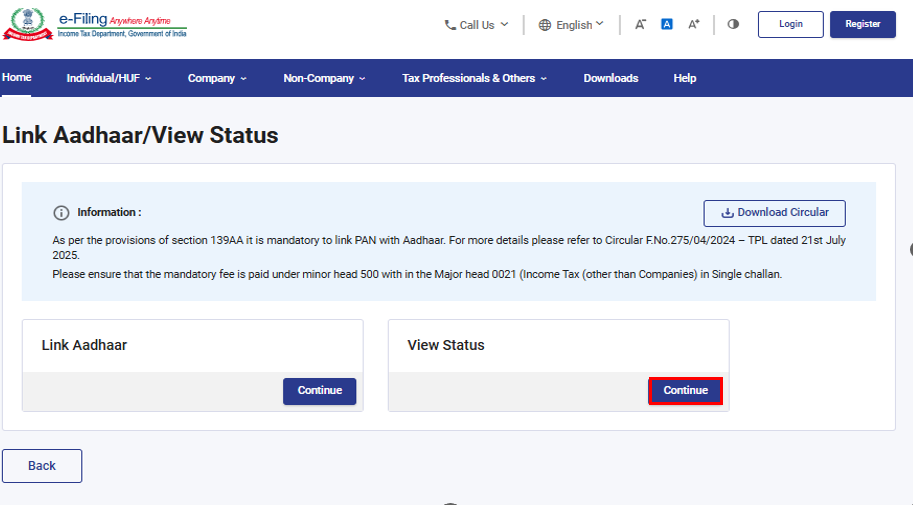
Step 1: On the e-Filing Portal homepage, under 'Quick Links', click 'Link Aadhaar/View Status'.
Step 2: Click on ‘Continue’ in ‘View Status’ tile.
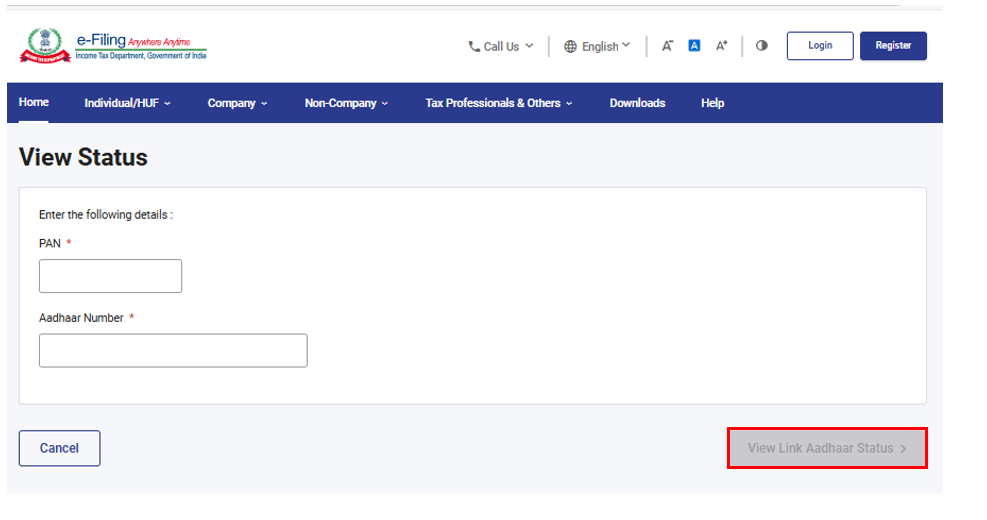
Step 3:Enter your PAN and Aadhaar Number and click ‘View Link Aadhaar Status’.
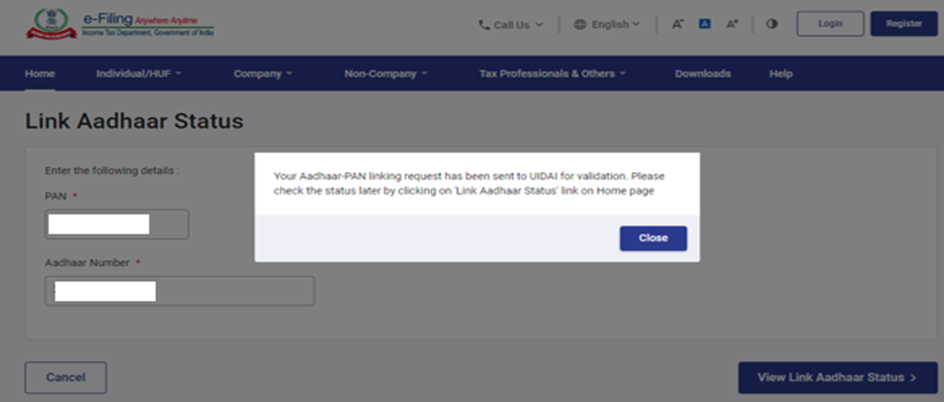
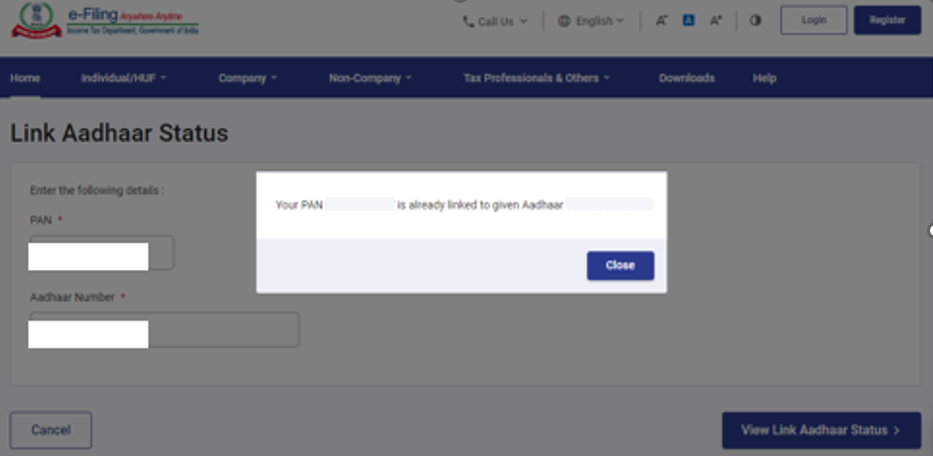
On successful validation, a message will be displayed regarding your Link Aadhaar Status.
If the Aadhaar-PAN link is in progress:
If the Aadhaar-PAN linking is successful:
6. View Link Aadhaar Status (Post-Login)
Step 1: After Login, on your Dashboard, click ‘Link Aadhaar’.
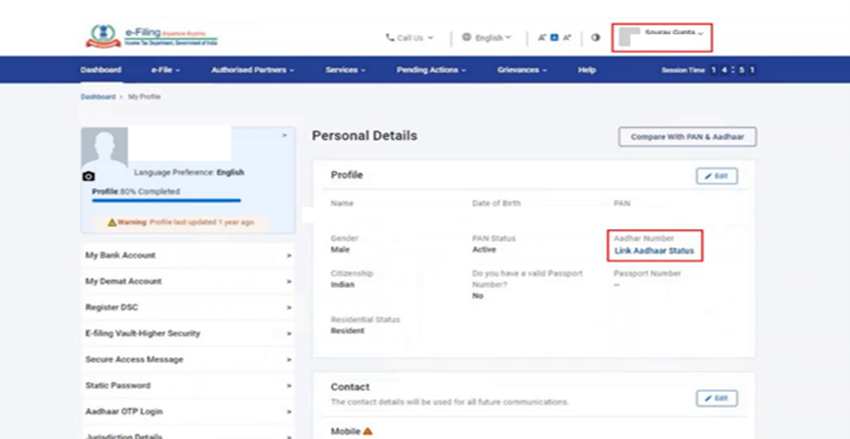
Step 2: Alternatively, you can go to ‘My Profile’ > ‘Link Aadhaar Status’.
(If your Aadhaar is already linked, Aadhaar number will be displayed. If Aadhaar is not linked ‘Link Aadhaar Status’ is displayed).
Note:
- If the validation fails, click 'Link Aadhaar' on the Status page, and you will need to repeat the steps to link your PAN and Aadhaar.
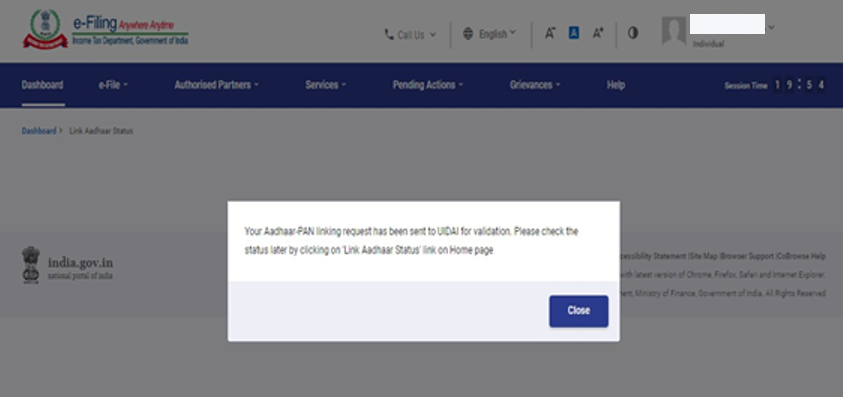
- If your request to link PAN and Aadhaar is pending with UIDAI for validation, you will need to check the status later.
- You may need to contact the Jurisdictional AO to delink Aadhaar and PAN if:
- your Aadhaar is linked with some other PAN
- your PAN is linked with some other Aadhaar
On successful validation, a message will be displayed regarding your Link Aadhaar status.
DISCLAIMER:
This user manual is issued for information and general guidance purposes only. Taxpayers are advised to refer to relevant circulars, notifications, rules and provision of the I.T. Act for precise information, interpretations, clarifications applicable to their cases. The department will not be responsible for actions taken and/or decisions made based on this user manual.