



Tax Payment Modes under e‑Pay Tax
1. Overview
The e‑Filing portal (www.incometax.gov.in) provides a unified e‑Pay Tax service that enables taxpayers to pay direct taxes seamlessly.
Regardless of whether the payment relates to the Income‑tax Act, 1961 or the Income‑tax Act, 2025, the available modes of tax payment remain unchanged.
The platform supports five standard payment modes, which are as below:
- Net Banking – Using bank’s net banking login.
- Debit Card – Using ATM/debit cards of authorised banks.
- Pay at Bank Counter (OTC) – Cash, Cheque, or Demand Draft.
- RTGS/NEFT – From any bank using generated mandate form.
- Payment Gateway – Through credit card, debit card, UPI, or net banking.
2. Prerequisites for availing this service
You can make Tax Payment by using both Pre-login (before logging in the e-Filing portal) or post-login (after logging in the e-Filing portal) mode.
Common Pre-requisites for using any mode of payment from all 5 options referred in over
|
Pre-Login |
|
|
Post Login |
|
3. Common Steps (Before Selecting Payment Mode) – Both Post & Pre-login
3.1 Generate Challan Form (CRN) (Post Login)
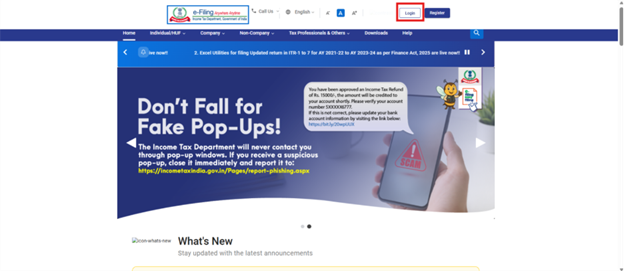
Log in to the e-Filing portal with your User ID and Password.
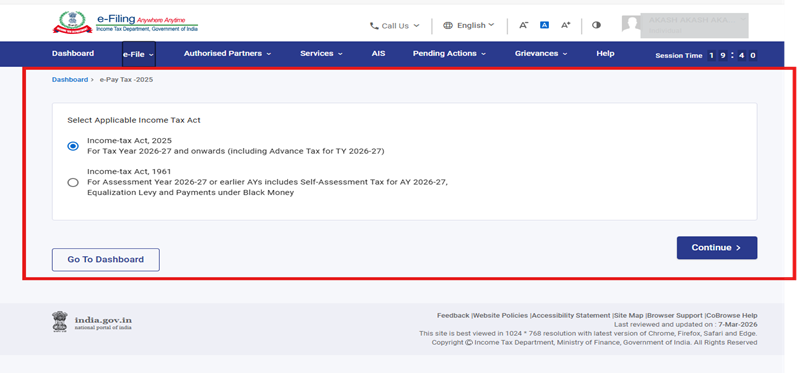
3.2 On the Dashboard, click e-File > e-Pay Tax. User will be navigated to the Act Selection screen. After making the appropriate selection, click the Continue button. You will be then navigated to the e-Pay Tax.
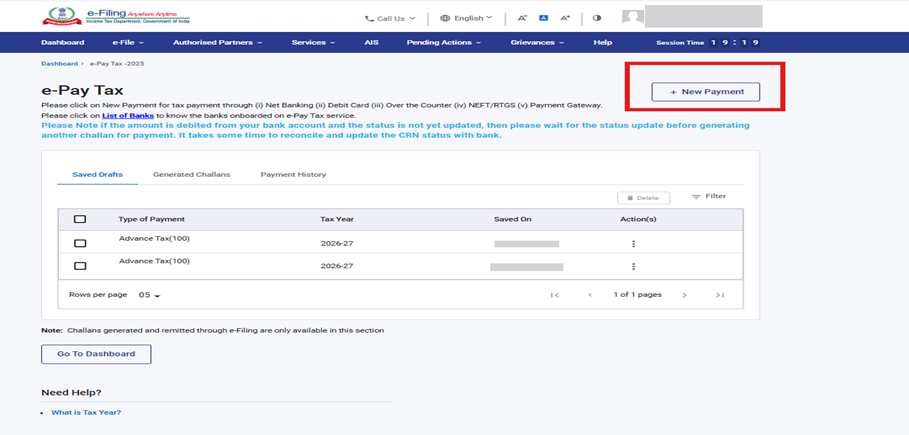
On the e-Pay Tax page, click the New Payment option to initiate the online tax payment.
3.3 On the New Payment page, click Proceed on a tax payment tile applicable to you. Refer User Manual for Challan Creation through PAN Login/ TAN Login to select applicable tile
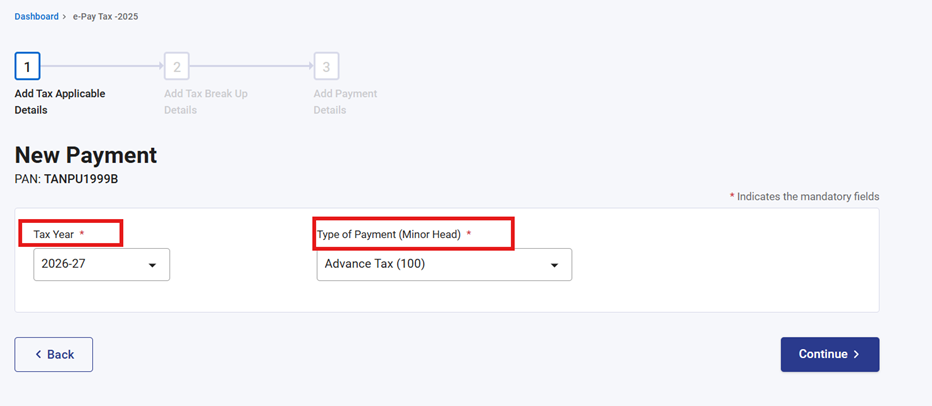
3.4 After selecting the applicable Tax Payment tile, select appropriate year (Assessment Year/Tax year), Minor head, other details (as applicable) and click Continue.
3.5 On the Add Tax Breakup Details page, add the breakup of total amount of tax payment and click Continue.
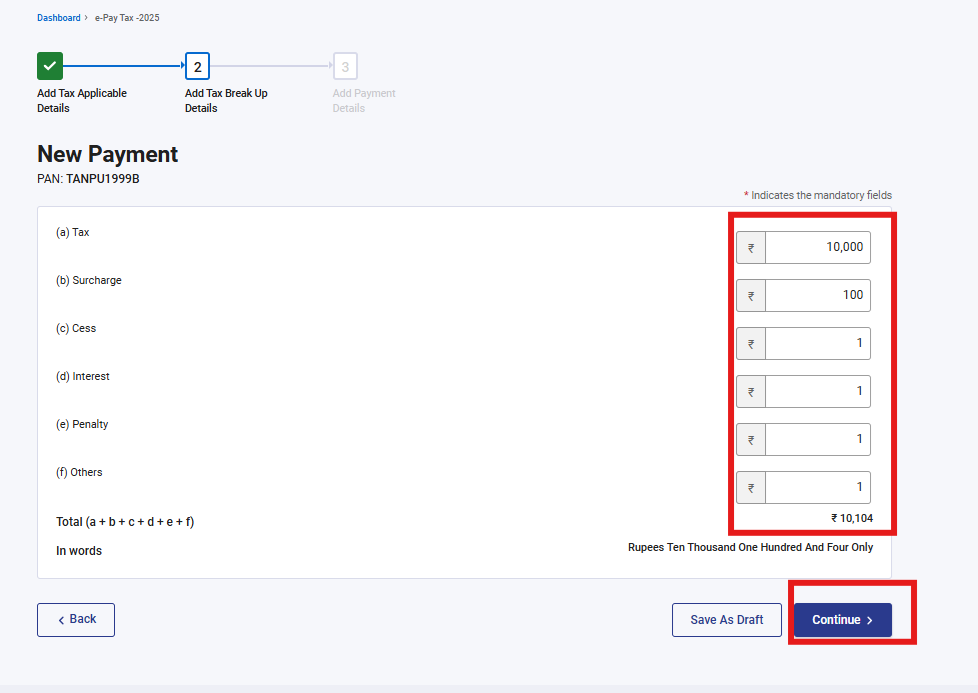
3.6 In the Select Payment Mode page and complete the payment as directed in respective sections
|
Sl. No. |
Payment Mode |
Refer Section |
|
1 |
Net Banking |
Refer Section 4 for details |
|
2 |
Debit Card |
Refer Section 5 for details |
|
3 |
Pay at Bank Counter |
Refer Section 6 for details |
|
4 |
RTGS/NEFT |
Refer Section 7 for details |
|
5 |
Payment Gateway |
Refer Section 8 for details |
3.7 Pay without logging in to the e-Filing portal – Pre-Login Service
3.7.1 Go to the e-Filing portal www.incometax.gov.in and click e-Pay Tax.
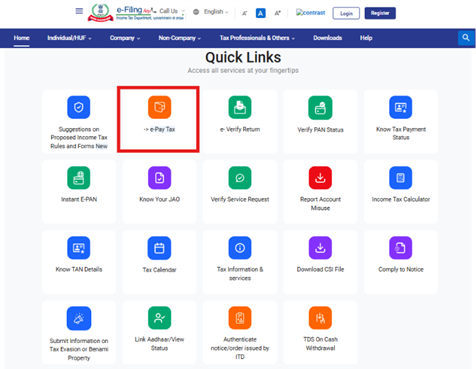
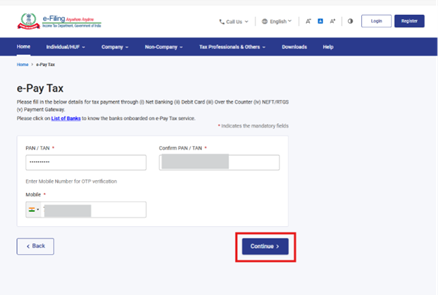
3.7.2 On the e-Pay Tax page, fill the required details as referred in below screenshot and click Continue.
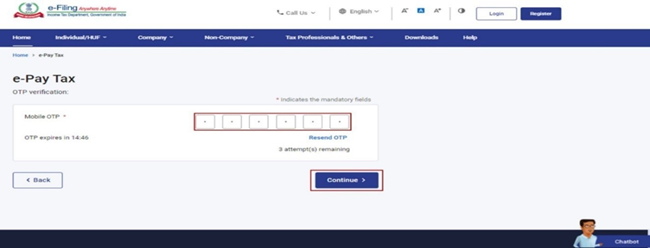
3.7.3 On the OTP Verification page, enter the 6-digit OTP received on the mobile number entered in Step 2 and click Continue.
3.7.4 After OTP verification, a success message with your PAN/TAN and masked name will be displayed. Click Continue to proceed.
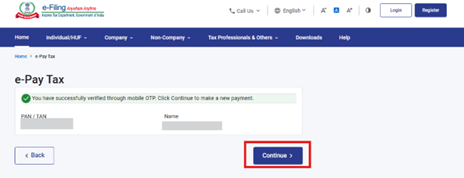
3.7.5 On the e-Pay Tax page, click Proceed on a tax payment category that applies to you.
- Select radio button “Income Tax Act 1961”, to make payments for Assessment Years upto 26-27 and Prior Years
- Select “Income Tax Act 2025”, for making payments for TY 2026–27 onwards
3.7.6 Further, steps will remain same as referred in section 3.3 to 3.6
4. Mode 1 - Payment through Net Banking
Tax payment on e-Filing Portal (e-Pay Tax service) through Net Banking mode is available through authorized Banks. Please refer Annexure 1 for list of Authorized Banks (As on 01st April 2026). For other banks, please use the Payment Gateway or RTGS/NEFT option.
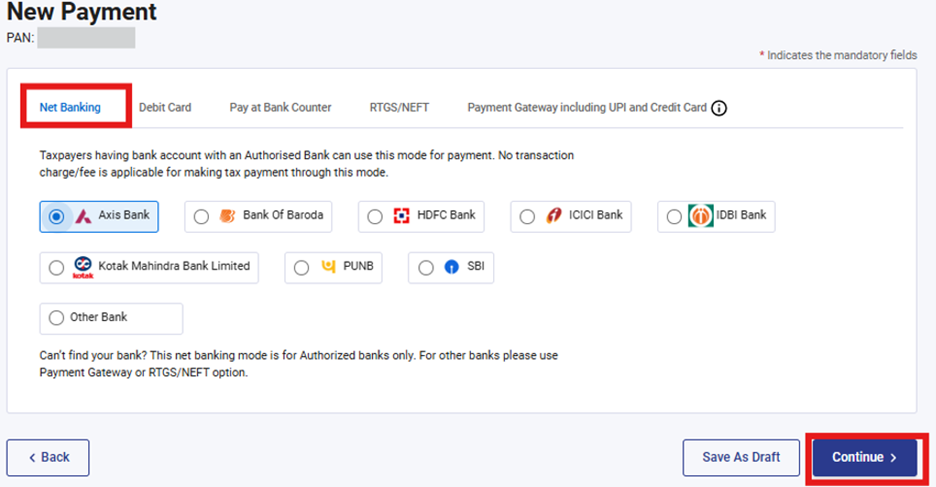
4.1 In the Select Payment Mode page, select the Net Banking mode and select the bank name from the options and click Continue.
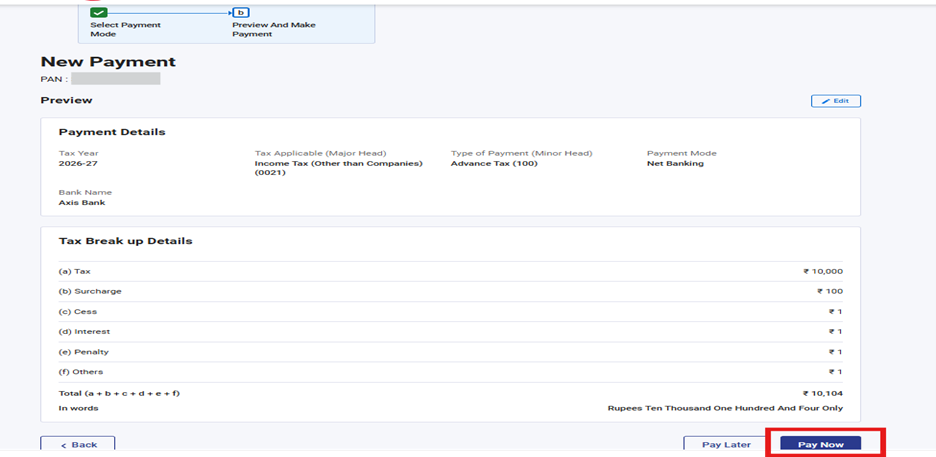
4.2 In the Preview and Make Payment page, verify the details and tax break up details and click Pay Now.
4.3 On Click of continue, please refer the terms & conditions specified in the pop-up and select the check box to proceed further
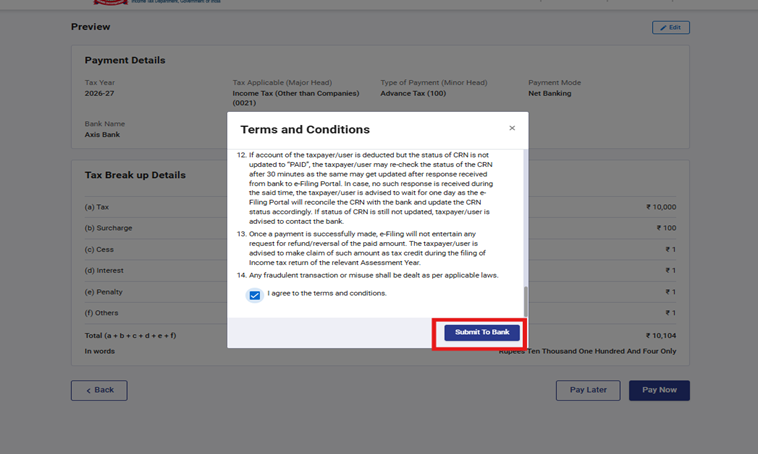
4.4 On click of continue, you will be redirected to bank login page, where user is expected to enter Net banking login credentials of authorized bank and complete the payment process
4.5 After successful payment, you will receive a confirmation e-Mail and an SMS on the e-mail ID and Mobile number registered with the e-Filing portal. Once the payment is successful, details of payment and Challan Receipt are available under Payment History Tab on the e-Pay Tax page.
5. Mode 2 – Payment through Debit Card
The Tax Payment through Debit Card of Authorised Banks option is available to all taxpayers. With this service, you can make tax payment online (in Pre-login or Post-login mode) by using the Debit Card of an Authorized Bank available for making online tax payment on e-Filing Portal.
5.1 Select the Debit Card mode and select the bank name from the options and click Continue.
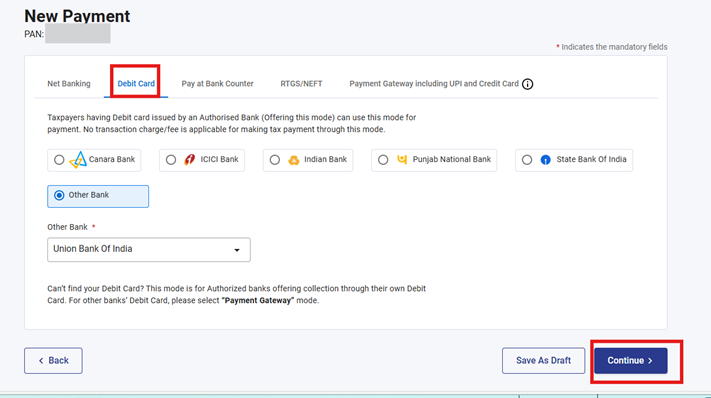
Note:
- Please note that taxpayers having debit card issued by an Authorized Bank (offering tax payment through debit card on e-filing portal) can use this mode for tax payment.
- No transaction charge/fee is applicable for making tax payment through this mode. As of now, debit cards of Canara Bank, ICICI Bank, Indian Bank, State Bank of India, Punjab National Bank and union bank of India are being offered for tax payment on e-Filing Portal (e-Pay Tax service) through Debit Card mode. For other banks, please select payment gateway mode.
5.2 In the Preview and Make Payment page, verify the details and tax break up details and click Pay Now.
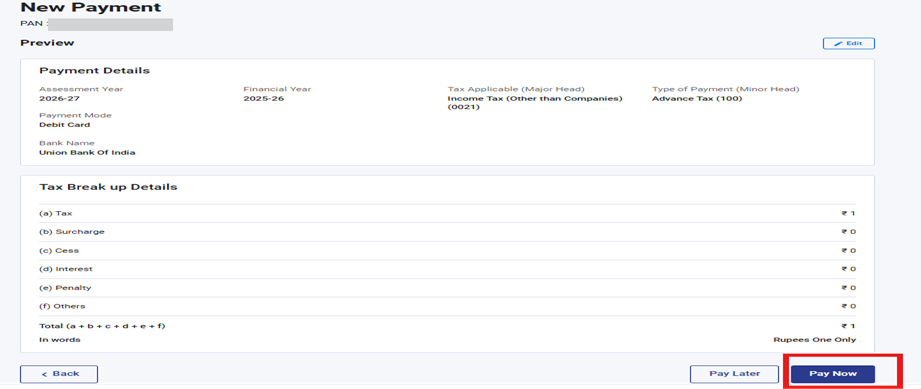
5.3 Upon clicking Pay Now, the user will be redirected to the Terms & Conditions page. The user must select the Terms & Conditions checkbox and then click the Submit to Bank button to proceed.
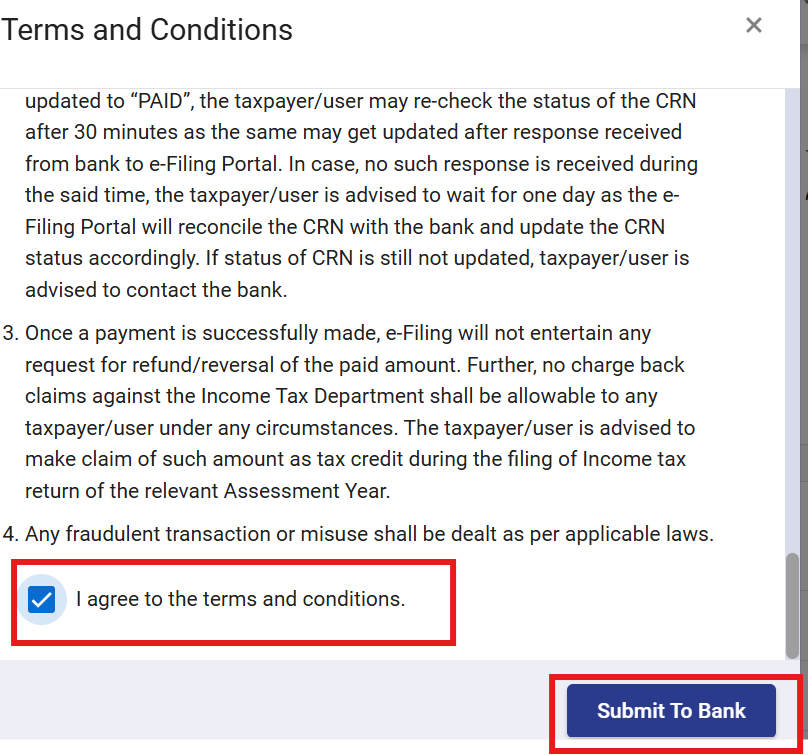
5.4 After clicking the Submit to Bank button, the user will be navigated to the bank’s website. There, the user must enter the required details as requested by the bank’s page, such as card information. After entering the details and submitting OTP, the user will be redirected back to the e Filing website.
5.5 After successful payment, you will receive a confirmation e-Mail and an SMS on the e-mail ID and Mobile number registered with the e-Filing portal. Once the payment is successful, details of payment and Challan Receipt are available under Payment History Tab (Post Login) on the e-Pay Tax page.
6. Mode 3 – Payment through Pay at counter mode
The Tax Payment using “Pay at Bank Counter” is available to all taxpayers on the e-Filing portal www.incometax.gov.in (in pre-login or post-login mode). With this service, you can make tax payment by paying over the counter of the Bank selected by you while generating the Challan Form (CRN) (through Cash / Cheque / Demand Draft).
You can make Tax Payment using “Pay at Bank Counter” in Pre-login (before logging in the e-Filing portal) or post-login (after logging in the e-Filing portal) mode.
This option cannot be used by a taxpayer being a Company or a person (other than a company) to whom provisions of section 63 are applicable as per Rule 333 of Income Tax Rules, 2026
Taxpayer can avail this mode to pay taxes at the counter of Authorized banks.
- Signed copy of Challan Form along with payment instrument (cash, cheque or demand draft) needs to be presented before the branch of the selected Authorized Bank to make payment.
- Tax Payment of more than Rs. 10,000/- (Rupees Ten Thousand Only) in cash is not allowed under this mode.
- No transaction charge/fee is applicable for making tax payment through this mode.
6.1 In the Select Payment Mode page, select the Pay at Bank Counter mode and select payment through cheque, cash or demand draft and then, select the Bank Name from the options and click Continue.
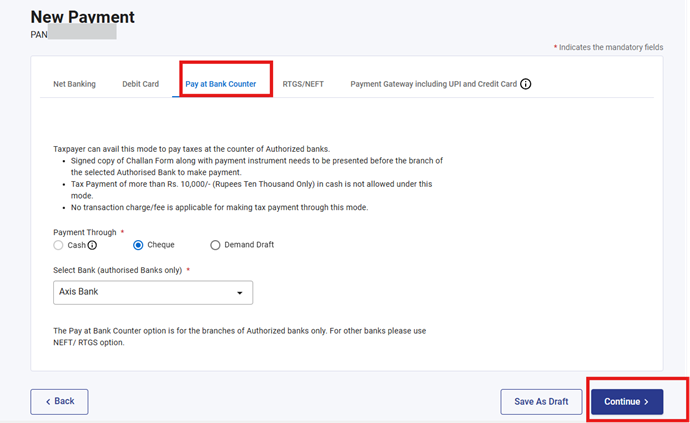
6.2 In the Preview and Download Challan Form page, verify the details and tax break up details and click Continue.
6.3 The Challan Form will be generated successfully. Print the Challan Form (CRN) and visit any branch of the selected Bank for making the payment.
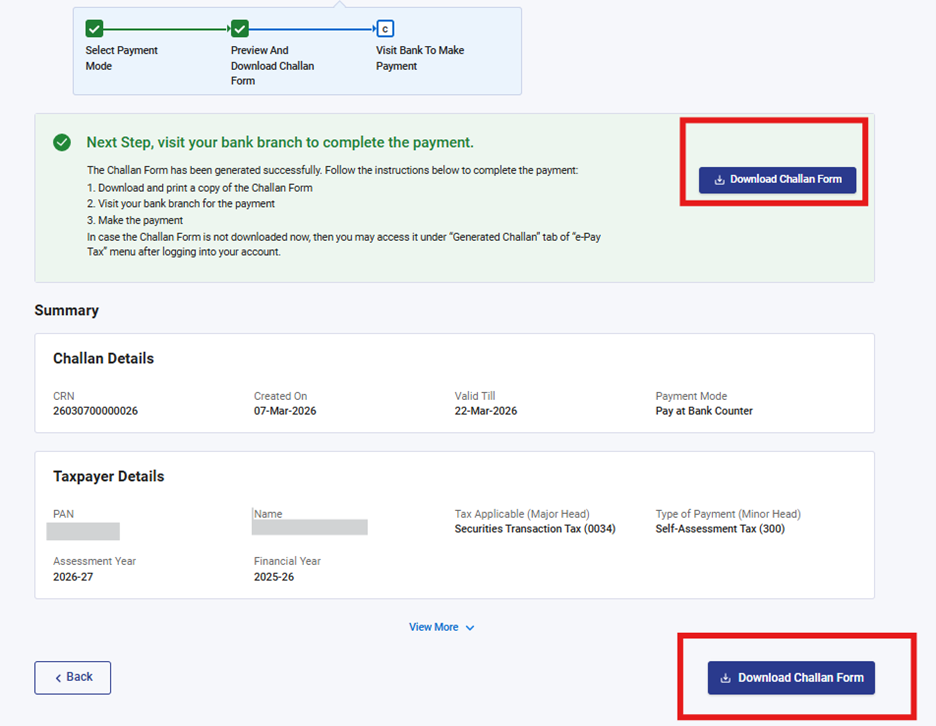
6.4 After successful payment, you will receive a confirmation e-Mail and an SMS on the e-mail ID and Mobile number registered with the e-Filing portal. Once the payment is successful, Challan Receipt may be downloaded for future references. The details of payment and Challan Receipt are also available under Payment History tab on the e-Pay Tax page post-login.
7. Mode 4 – Payment through RTGS/NEFT mode
The Tax Payment using “RTGS/NEFT” is available to all taxpayers on the e-Filing portal www.incometax.gov.in (in pre-login or post-login mode). With this service, you can make tax payment through RTGS/NEFT
Important Note:
- The taxpayer can also make payment using RTGS/NEFT mode through any bank.
- This facility needs to be availed only after generating a CRN using e-Pay Tax service on e-Filing portal.
7.1 In the Select Payment Mode page, select RTGS/NEFT mode and click Continue.
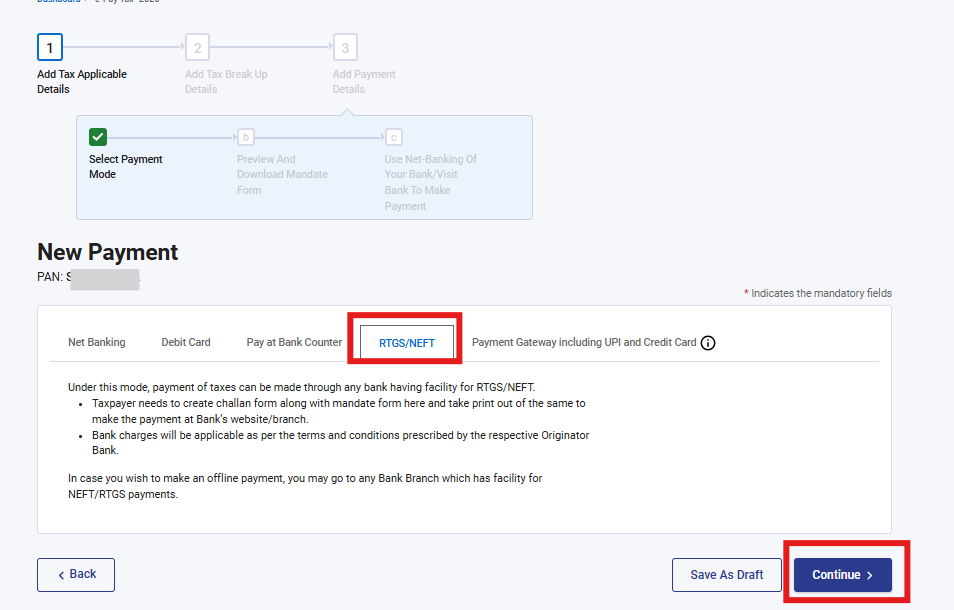
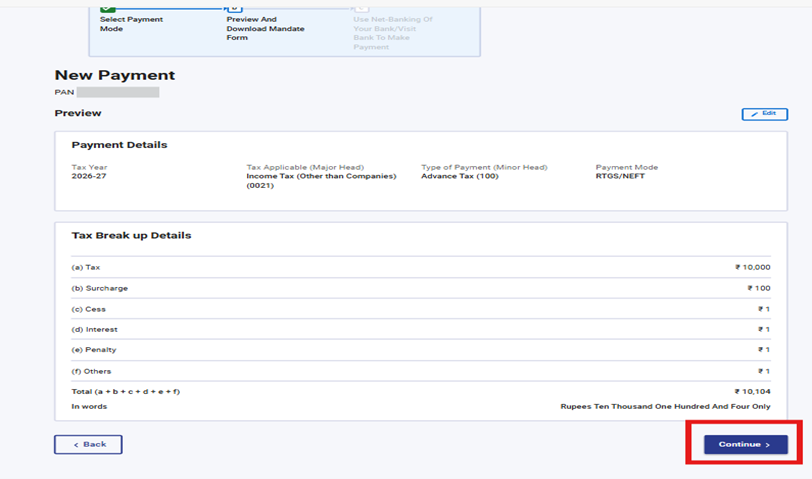
7.2 In the Preview and Download Mandate Form page, verify the details and tax break up details and click Continue.
7.3 The Mandate Form will be generated successfully. Print the Mandate Form (CRN) and visit any bank branch providing RTGS/NEFT facility for making the payment. You can also remit the tax amount by using Net banking facility of the bank available [For this beneficiary needs to be added in your bank account with beneficiary details available in Mandate Form and tax amount needs to be transferred to the added account].
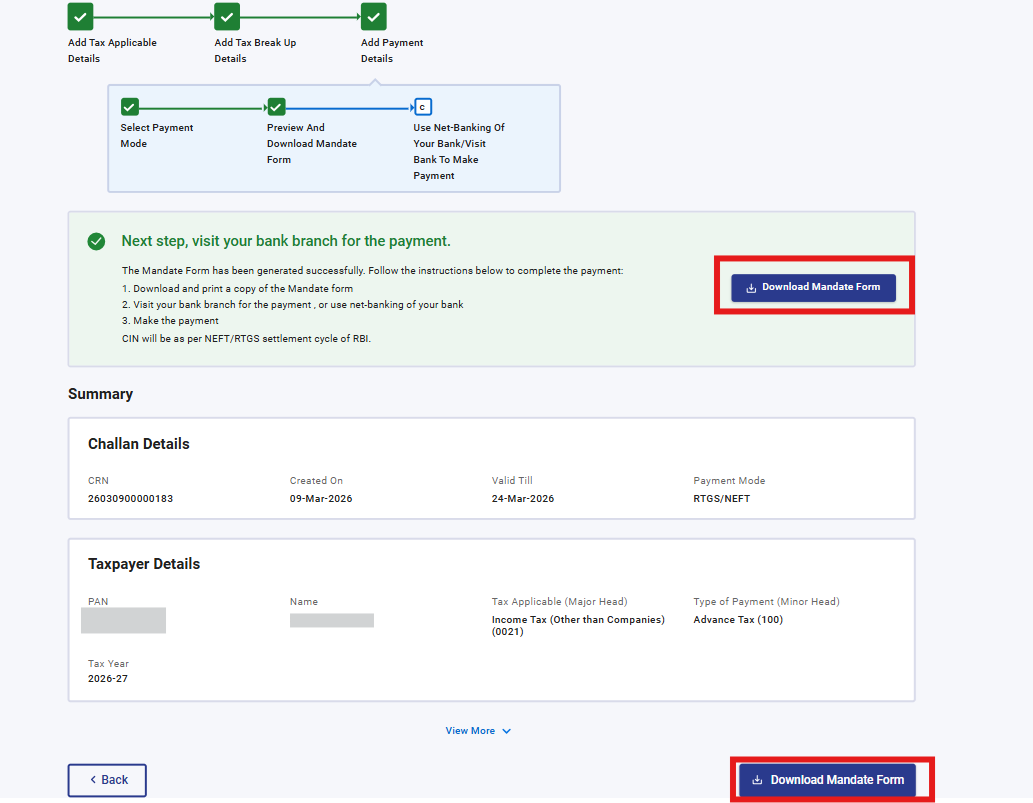
7.4 After successful payment, you will receive a confirmation e-Mail and an SMS on the e-mail ID and Mobile number registered with the e-Filing portal. Once the payment is successful, details of payment and Challan Receipt are available under Payment History Tab on the e-Pay Tax page.
8. Mode 5 - Payment through Payment Gateway mode
The Tax Payment through Payment Gateway option is available to all taxpayers on the e-Filing portal www.incometax.gov.in With this service, you can make tax payment online (in pre-login or post-login mode) by using Payment Gateway which enables you to make tax payment through Credit Card, Debit Card, Net-banking and UPI. The selected payment gateway will redirect to its own page and provide all the options available with that gateway. The transaction charges as per Annexure 2, will be applicable over and above the tax amount in this mode.
Currently, the tax payment on e-Filing Portal (e-Pay Tax service) through Payment Gateway mode is available through authorized banks only
8.1 In Select Payment Mode page, select Payment Gateway mode and click Continue.
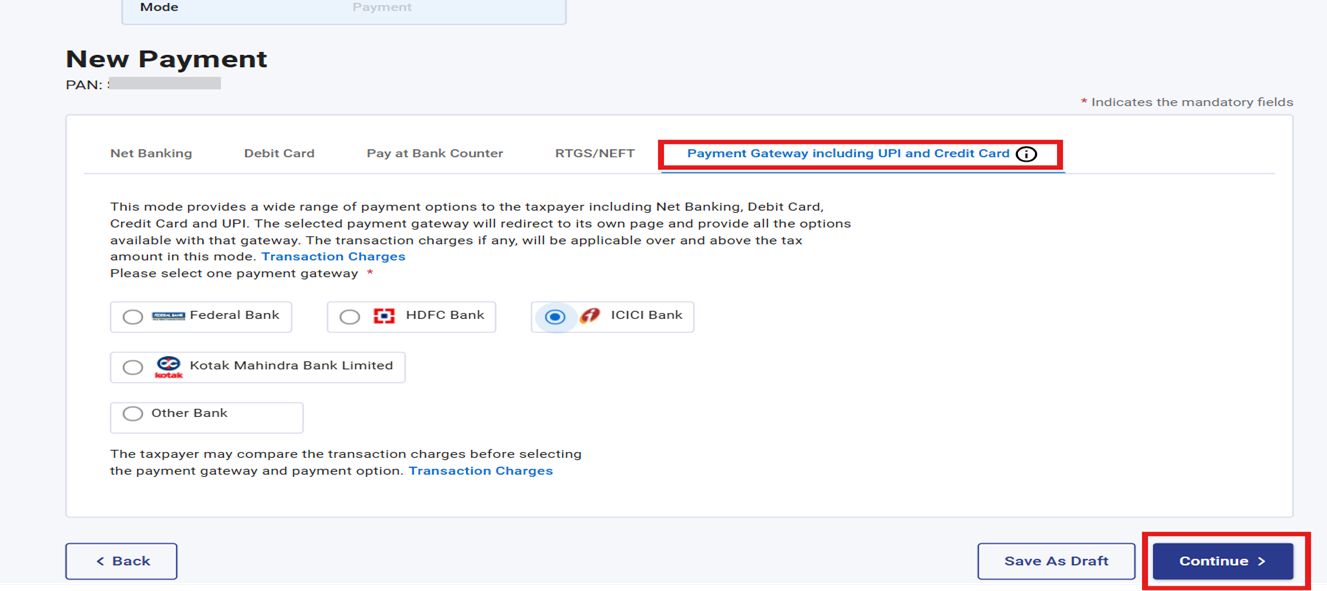
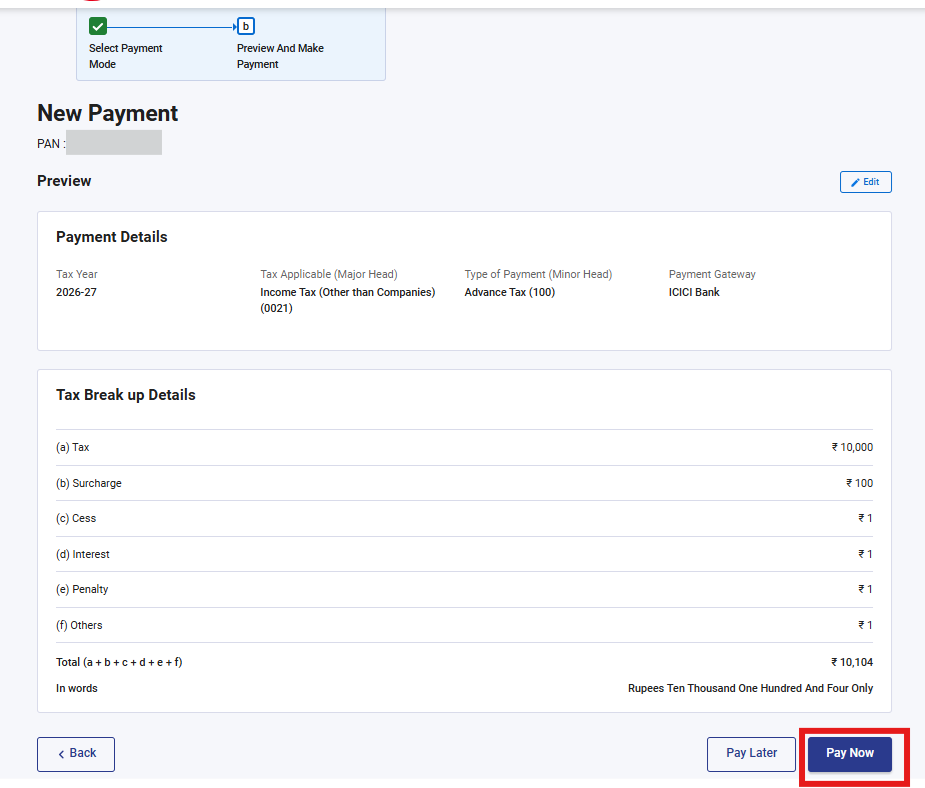
8.2 In the Preview and Make Payment page, verify the details and tax break up details and click Pay Now.
8.3 Read and select the terms and conditions and click Submit to Bank. (You will be redirected to the website of Payment Gateway where you can login or enter Net Banking/ Debit / Credit Card / UPI details and make the payment).
(You may compare transaction charges (as per Annexure 2) of the five payment gateways before selecting the payment option)
8.4 After successful payment, you will receive a confirmation e-Mail and an SMS on the e-mail ID and Mobile number registered with the e-Filing portal. Once the payment is successful, details of payment and Challan Receipt are available under Payment History Tab on the e-Pay Tax page.
Annexure 1: list of Authorized Banks (As on 01st April 2026)
|
S. No. |
Bank Name |
|
1 |
Axis Bank |
|
2 |
Bandhan Bank |
|
3 |
Bank of Baroda |
|
4 |
Bank of India |
|
5 |
Bank of Maharashtra |
|
6 |
Canara Bank |
|
7 |
Central Bank of India |
|
8 |
City Union Bank |
|
9 |
DCB Bank |
|
10 |
Federal Bank |
|
11 |
HDFC Bank |
|
12 |
ICICI Bank |
|
13 |
IDBI Bank |
|
14 |
Indian Bank |
|
15 |
Indian Overseas Bank |
|
16 |
IndusInd Bank |
|
17 |
Jammu & Kashmir Bank |
|
18 |
Karur Vysya Bank |
|
19 |
Kotak Mahindra Bank |
|
20 |
Punjab & Sind Bank |
|
21 |
Punjab National Bank |
|
22 |
RBL Bank |
|
23 |
South Indian Bank |
|
24 |
State Bank of India |
|
25 |
UCO Bank |
|
26 |
Union Bank of India |
|
27 |
Dhanlaxmi Bank |
|
28 |
IDFC First Bank |
|
29 |
Karnataka Bank |
|
30 |
Reserve Bank of India |
|
31 |
Tamilnad Mercantile Bank |
|
32 |
Yes Bank |
|
33 |
DBS Bank India Limited |
Annexure 2: Transaction Charges
|
Payment Gateway Charges – Federal Bank |
|
|
Mode of Payment |
Transaction Charges (INR) |
|
Net Banking |
Convenience Fee |
|
HDFC Bank – INR 12* |
|
|
ICICI Bank – INR 9* |
|
|
SBI Bank – INR 7* |
|
|
Axis Bank – INR 7* |
|
|
Other Banks (incl. Federal Bank) – INR 5* |
|
|
Debit Card (Other Bank) (Transaction value <2,000) |
NIL |
|
Debit Card (Other Bank) (Transaction value >=2,000) |
NIL |
|
Credit Card (Federal Bank) |
0.85%* |
|
Credit Card (Other Bank) |
0.85% * |
|
Debit Card powered by RuPay |
NIL |
|
Unified Payments Interface (UPI) (BHIM-UPI) |
NIL |
|
Unified Payments Interface Quick Response Code (UPI QR Code) (BHIM-UPI QR Code) |
NIL |
|
* Extra GST will be levied @18% |
|
|
Payment Gateway Charges – Canara Bank |
|
|
Mode of Payment |
Transaction Charges (INR) |
|
Net Banking (HDFC/ICICI/Yes) |
INR 14* |
|
Net Banking (Other Bank) |
INR 6* |
|
Debit Card (Other Bank) (Transaction value <2,000) |
NIL |
|
Debit Card (Other Bank) (Transaction value >=2,000) |
NIL |
|
Credit Card (Canara Bank) |
0.90%* |
|
Credit Card (Other Bank) |
0.90%* |
|
Debit Card powered by RuPay |
NIL |
|
Unified Payments Interface (UPI) (BHIM-UPI) |
NIL |
|
Unified Payments Interface Quick Response Code (UPI QR Code) (BHIM-UPI QR Code) |
NIL |
|
* Extra GST will be levied @18% |
|
Payment Gateway Charges – Kotak Mahindra Bank
|
Mode of Payment |
Transaction Charges (INR) |
|
Net Banking (Axis/HDFC/ICICI/Kotak/SBI) |
INR 7* |
|
Net Banking (Other Bank) |
INR 5* |
|
Debit Cards (VISA / MasterCard) - Upto Rs 2000 |
Nil |
|
Debit Cards (VISA / MasterCard) - Above Rs 2000 |
Nil |
|
Debit Cards (RuPay) / UPI / UPI QR |
Nil |
|
Credit Cards (Master/VISA/RuPay) |
0.80%* |
|
Credit Cards (International) |
2.75%* |
|
*Extra GST will be levied @ 18% |
|
Payment Gateway Charges-SBI Bank
|
Mode of Payment |
Transaction Charges (INR) |
|
Net Banking (Other Bank) |
INR 5.08* |
|
Debit Card (Other Bank) (Transaction value <2,000) |
Not Applicable |
|
Debit Card (Other Bank) (Transaction value >=2,000) |
Not Applicable |
|
Credit Card (SBI Bank) |
Not Applicable |
|
Credit Card (Other Bank) |
Not Applicable |
|
Debit Card powered by RuPay |
Not Applicable |
|
Unified Payments Interface (UPI) (BHIM-UPI) |
Nil |
|
Unified Payments Interface Quick Response Code (UPI QR Code) (BHIM-UPI QR Code) |
Nil |
|
* Extra GST will be levied @18% |
|
Payment Gateway Charges- HDFC Bank
|
Mode of Payment |
Transaction Charges (INR) |
|
Net Banking (Other Bank) |
Not Applicable |
|
Debit Card (Other Bank) (Transaction value <2,000) |
NIL |
|
Debit Card (Other Bank) (Transaction value >=2,000) |
NIL |
|
Credit Card (HDFC Bank) |
0.72%* |
|
Credit Card (Other Bank) |
0.80%* |
|
Debit Card powered by RuPay |
Nil |
|
Unified Payments Interface (UPI) (BHIM-UPI) |
Nil |
|
Unified Payments Interface Quick Response Code (UPI QR Code) (BHIM-UPI QR Code) |
Nil |
|
*Extra GST will be levied @ 18% |
|
Payment Gateway Charges- Bank of Maharashtra
|
Mode of Payment |
Transaction Charges (INR) |
|
Net Banking |
INR 15* |
|
Debit Card - Below Rs 2000 |
0.40%* |
|
Debit Card - Above Rs 2000 |
0.90%* |
|
Credit Card - Above Rs 2000 |
1.00%* |
|
Credit Card EMI- Master/Visa/RuPay |
1.00%* |
|
Unified Payments Interface (UPI) |
Nil |
|
Unified Payments Interface Quick Response Code (UPI QR Code) |
Nil |
|
*Extra GST will be levied @ 18% |
|
Payment Gateway Charges- Bandhan Bank
|
Mode of Payment |
Transaction Charges (INR) |
|
Net Banking (HDFC/ICICI/Yes) |
INR 12* |
|
Net Banking (Other Bank) |
INR 8* |
|
Debit Card (Other Bank) (Transaction value <2,000) |
NIL |
|
Debit Card (Other Bank) (Transaction value >=2,000) |
NIL |
|
Credit Card (Other Bank) |
1.00% (Convenience charge) |
|
Debit Card powered by RuPay |
NIL |
|
*Extra GST will be levied @ 18% |
|
Payment Gateway Charges- ICICI
|
Mode of Payment |
Transaction Charges (INR) |
|
Net Banking (Axis/HDFC/ICICI/Kotak/SBI/Yes) |
INR 7* |
|
Net Banking (Other Bank) |
INR 5* |
|
Debit Card powered by RuPay |
NIL |
|
Debit Card (Other Bank) |
INR 12/- + 0.15% |
|
Retail Credit Card |
0.85% |
|
Corporate Credit Card |
0.78% |
|
*Extra GST will be levied @ 18% |
|



