Challan Correction Request User Manual
1. Overview
The Income Tax eFiling portal now allows PAN holders to directly request corrections/rectify key challan details that were entered incorrectly at the time of payment.
Through this facility, taxpayers can modify important attributes such as the
- Tax Year,
- Assessment Year (A.Y.),
- Tax Applicable (Major Head), and
- Type of Payment (Minor Head).
These correction options help ensure that challans are accurately mapped to the taxpayer’s account, enabling smooth processing and timely reflection of tax credits without unnecessary delays.Please note : Correction of ITNS281N ( Correction through TAN) is available at Traces portal (www.tdscpc.gov.in)
2. Prerequisites for availing this service
Challan correction request can only be submitted post-login (after logging into e-Filing portal) facility.
|
Pre-requisites |
|
Note:
- The Challans pertaining to A.Y 2020-21 onwards are available for correction currently through the e-filing portal. Kindly approach Jurisdictional Assessing Officer for challan correction pertaining to previous years.
- Challan Correction request will be allowed only once on the e-filing portal for any submitted challan. If user wants to make further corrections in the challan, he/she may approach the Jurisdictional Assessing Officer.
- The time window for the correction request by taxpayer for changing Major Head (Tax Applicable) and Minor Head (Type of payment) on the e-filing portal will be within 30 days of the Challan Deposit Date
- The time window for the correction request by taxpayer for changing AY/Tax year on the e-filing portal will be within 7 days of the Challan Deposit Date.
3. Step-by-Step Guide
|
Create Challan Correction Request |
Refer to Section 3.1 |
|
Check Challan Correction Request Status |
Refer to Section 3.2 |
3.1. Create Challan Correction Request (Post Login)
Step 1: Log in to the e-Filing portal with user ID and password.
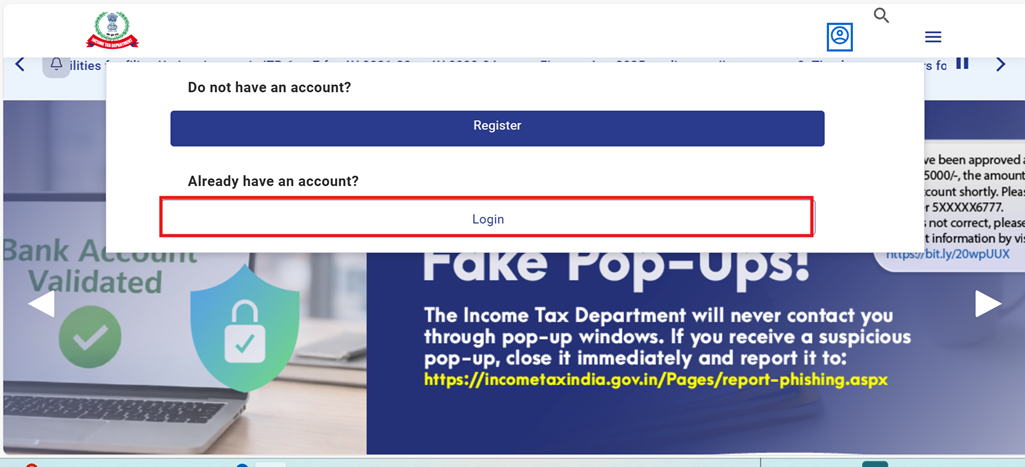
For Individual users, if PAN is not linked with the Aadhaar, you will see a pop-up message that your PAN is made inoperative as it is not linked with your Aadhaar.
To link the PAN with Aadhaar, click Link Now button else click Continue.
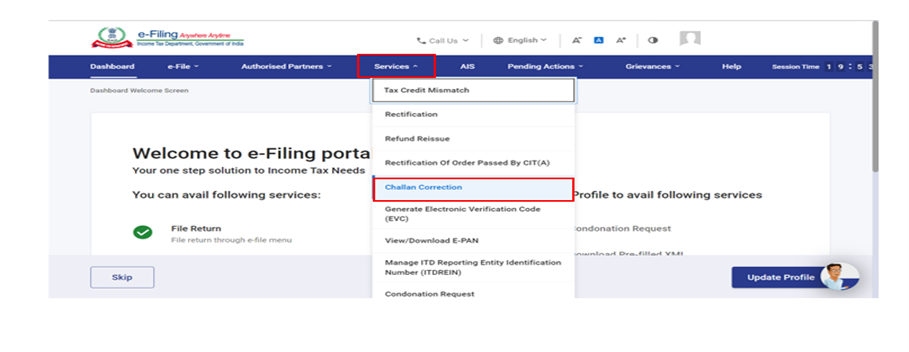
Step 2: On the Dashboard, click Services > Challan Correction.
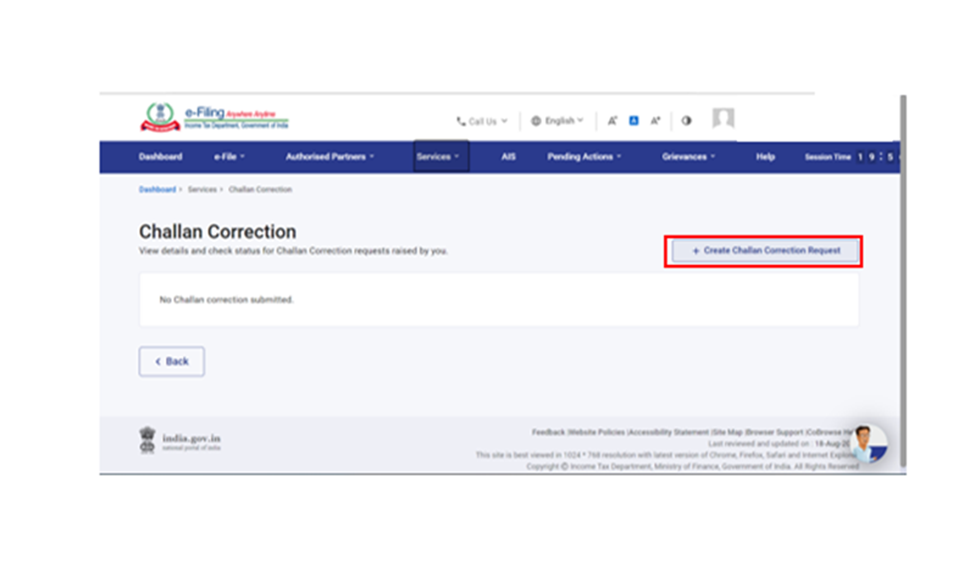
Step 3: On the Challan Correction page, click the “+ Create Challan Correction Request” option to create a new Challan Correction Request.
Step 4: You are required to select the relevant attribute for correction in the challan. Select the appropriate option (multiple options can be selected as applicable)and click Continue.
Note: The user can make the selection based on the table provided below.
|
Attributes for challan Correction |
Options |
Instructions |
Time limit upto correction is allowed |
|
Change in Taxation Year |
Tax Year (TY) or Assessment Year (AY) |
Please select Change in Tax Year, if you want to correct the challan originally generated on a Tax year basis Similarly, select Change in Assessment Year, if you want to correct challans that were originally generated on an Assessment Year basis |
Within 7 days of the Challan Deposit Date i.e CIN Generation |
|
Change in Tax Applicable |
100 |
Challan Correction Request can be submitted only for Minor Heads 100 (Advance Tax), 300 (Self-Assessment Tax) 400 (Demand Payment as Regular Assessment Tax) Please submit challan correction request to Jurisdictional Assessing Officer for Minor Heads other than 100, 300 and 400 |
Within 30 days of the Challan Deposit Date
|
|
Change in Tax Applicable (Major Head) |
Select the appropriate Major Head corresponding to the Minor Head (e.g., 0020, 0021, 0034,0023, 0028,0026,0023 etc.).
|
Please select the applicable major head as per challan |
Within 30 days of the Challan Deposit Date
|
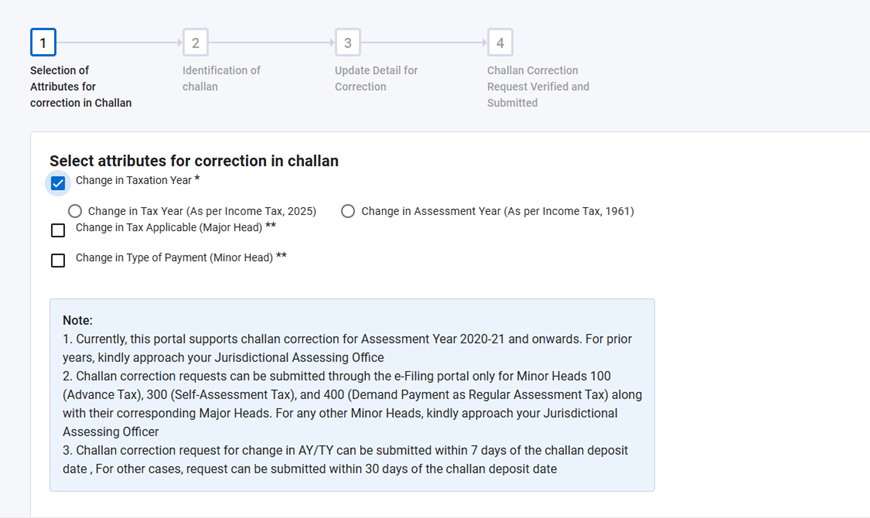
Step 5: You are required to select the Tax year/Assessment Year or Challan Identification Number (CIN) to create challan correction request .Based on selection the unconsumed challans will be displayed for the correction. Click Continue to proceed.
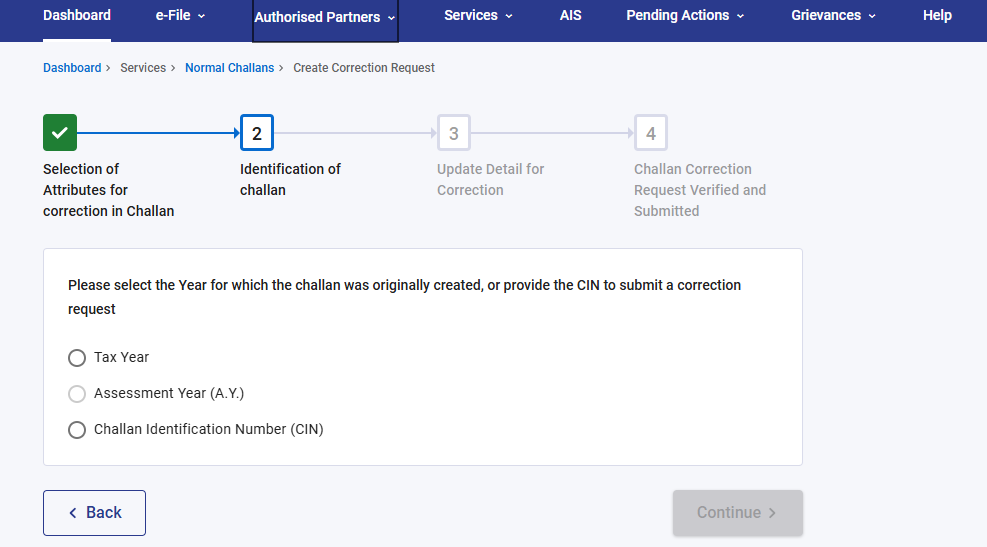
Note : If, in the previous screen, the user selected that the challan was originally created using a Tax Year basis, then the Tax Year & CIN option will be enabled on this screen, Similarly, if the challan was originally created on an Assessment Year (AY) basis, then the Assessment Year & CIN option will be available for selection The user can either enter the CIN (Challan Identification Number) directly, or select the relevant challan based on the Assessment Year/Tax Year for which they want to make a correction. If you click on any attribute and the system does not find the unconsumed challan data, an error message will be displayed.
“Please ensure that you are applying for correction only for unconsumed challans, as consumed challans are not eligible for online correction”
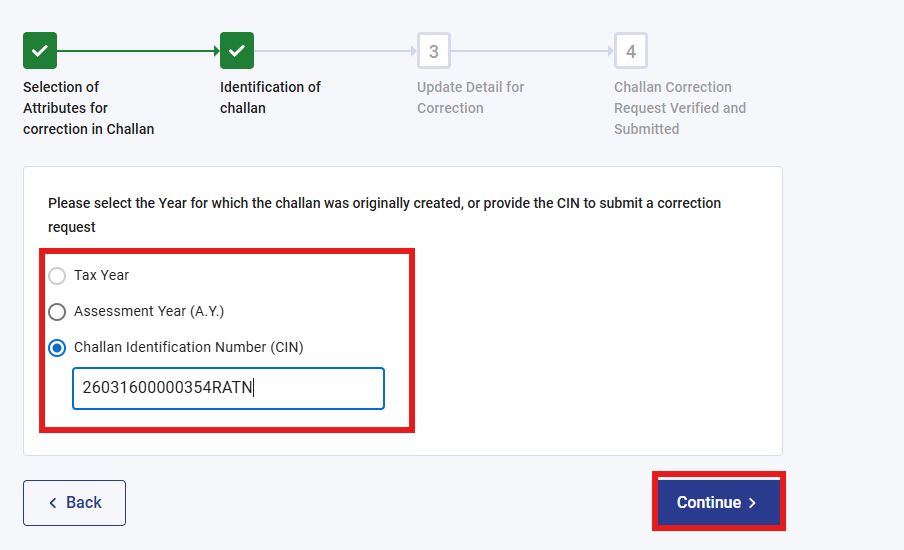
Step 6: Once the relevant challan is selected, the Correction in Challan page will open. On this page, the user can update the required challan attributes and then click Continue.
Through this page, the user can make the following types of corrections:
1. If original challan is created for Assessment Year → The user can change the Assessment Year to either Tax Year (TY) or Assessment Year (AY), modify the year for which the challan was paid (if required), and update the Major Head and Minor Head, as applicable.
2. If Original challan is created for TAX Year → The user can change the Tax Year to either Tax Year (TY) or Assessment Year (AY), modify the year for which the challan was paid (if required), and update the Major Head and Minor Head, as applicable.
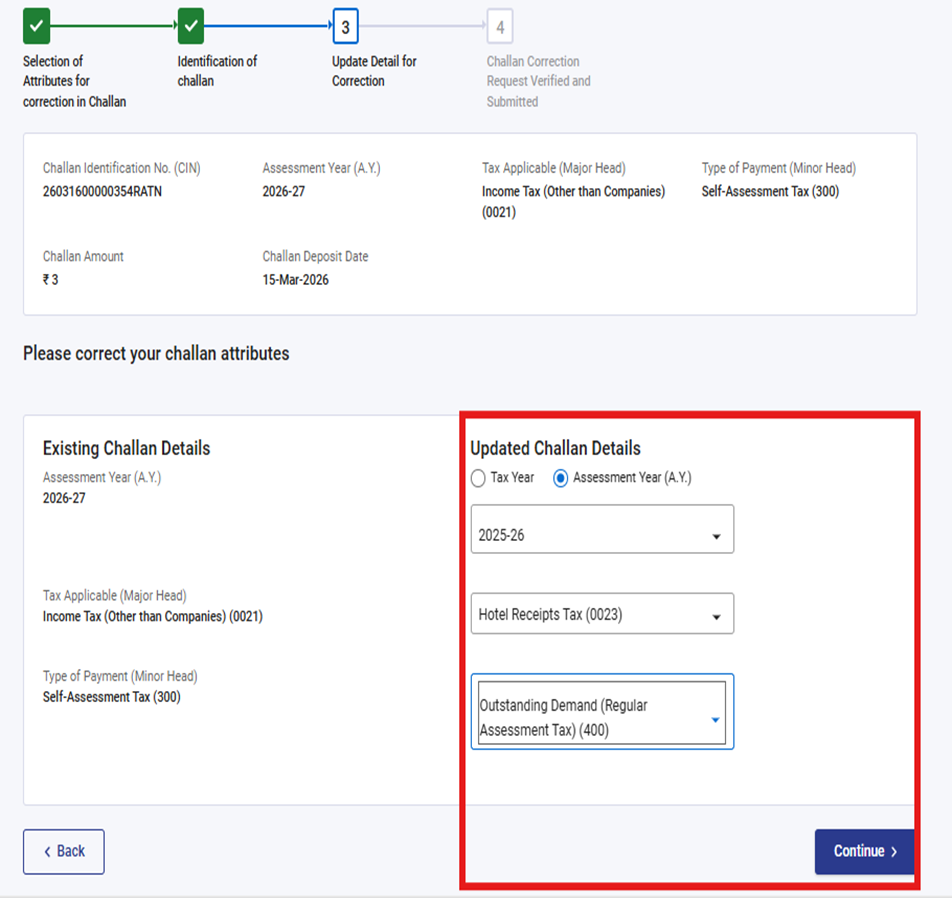
Please Note : Correction option will be enabled based on the option selected at step no 4.
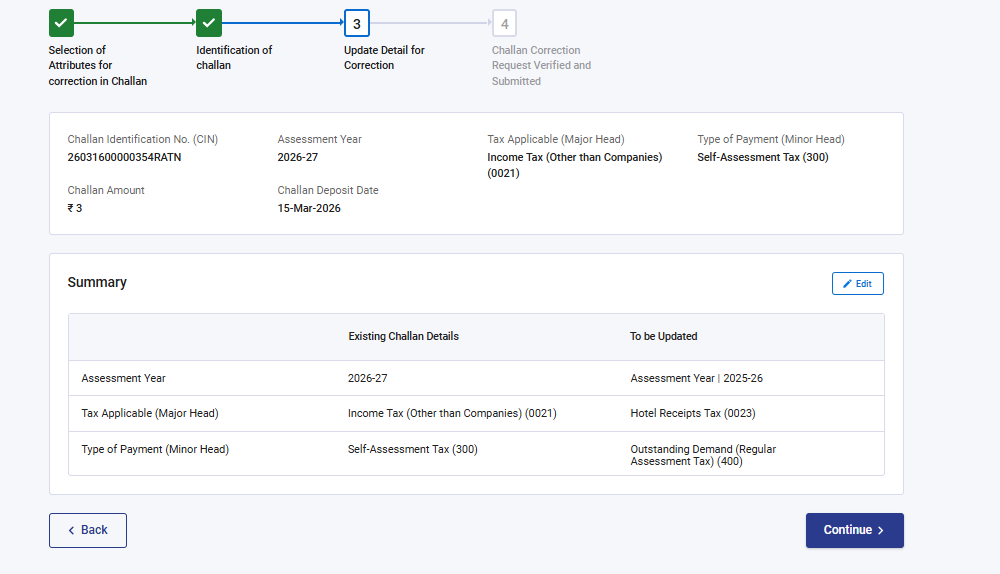
Step 7: Verify the summary of changes and if changes are correctly updated, click Continue.
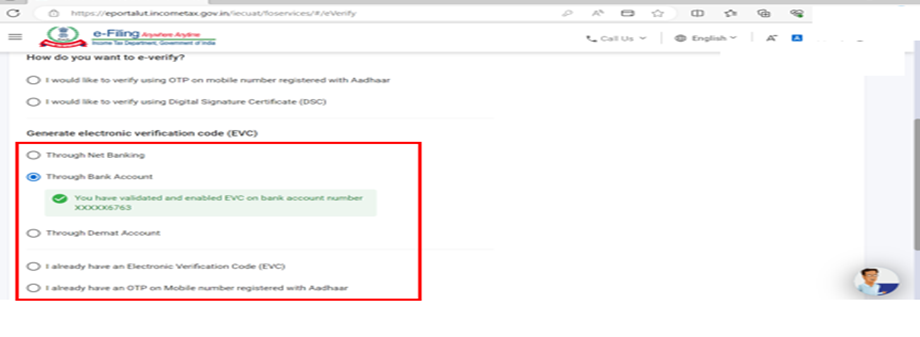
Step 8 : You are now required to e-Verify the challan correction request either through Aadhaar OTP, DSC, EVC or other options.
Please refer to How to e-Verify User Manual | Income Tax Department to know more.
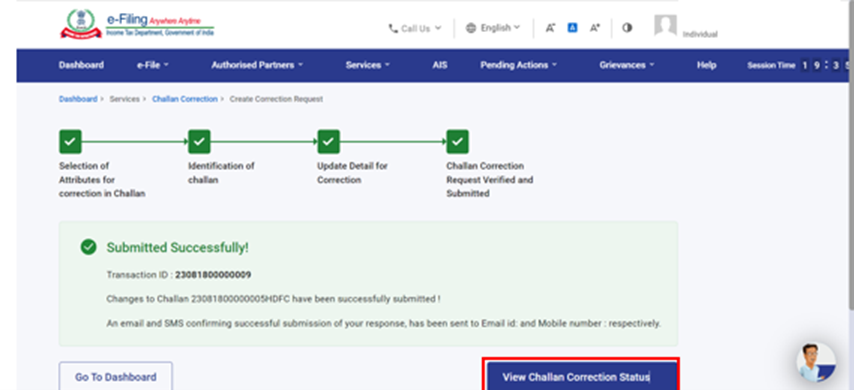
Step 9: Post e-verification, a success message will be displayed. You can click View Challan Correction Status to know the status of challan correction.
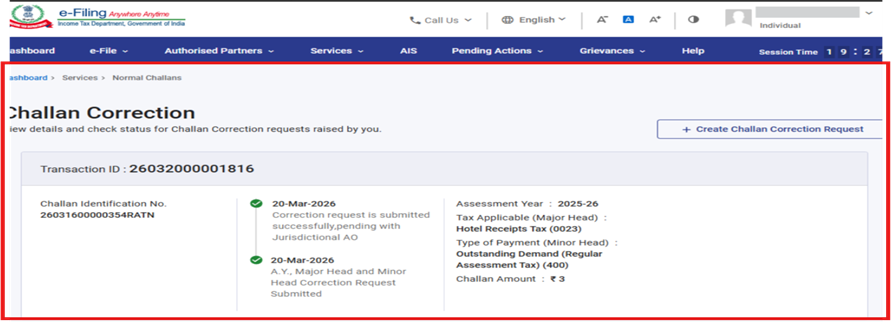
Step 10: To Check Challan Correction Request Status, please repeat Step 1 to Step 3 . At challan correction page” You can view details and check status for Challan Correction Requests raised by you”.Please refer below screen for your reference
Note: It may take 7–20 days for the challan correction status to be updated on the portal.